|
May 30, 2012
We hosted our open source JIDE Common Layer on java.net for several years now. Recently we started to look for a better home for it, something is more popular, more stable and easier to collaborate. We decided to land on github. Our new home for JIDE Common Layer is at https://github.com/jidesoft/jide-oss. The maven repository was discontinued since java.net stopped their maven service. We finally managed to resume it this time as well through sonatype. Now you can find all the past releases of JIDE Common Layer from http://search.maven.org/ with GroupID com.jidesoft and ArtifactID jide-oss.
November 22, 2011
We are pleased to announce the 3.3.0 release of JIDE products. There are several new components and features in this release.
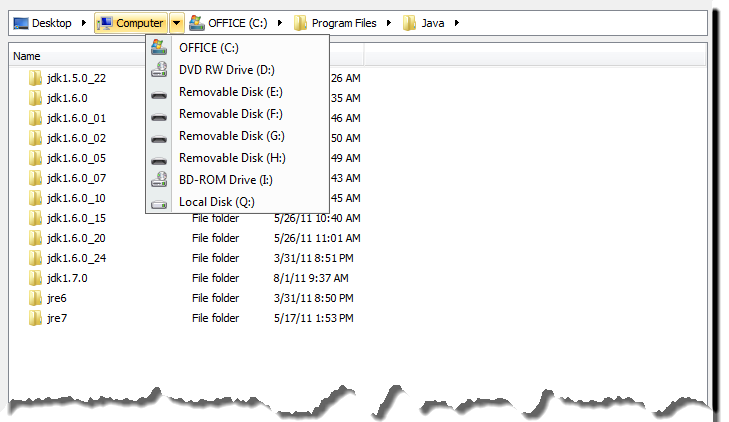
BreadcrumbBar
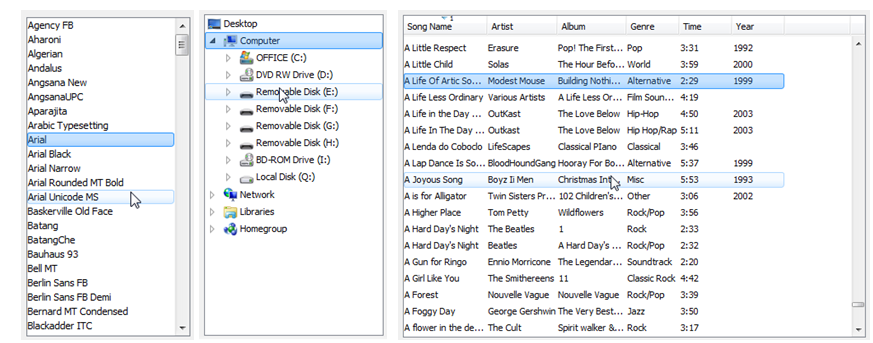
Breadcrumbs are navigation aids used in user interfaces. They allow users to keep track of their location within programs or documents. The term comes from the trail of breadcrumbs left by Hansel and Gretel in the popular fairytale. Both Windows 7 and Mac OS X introduced breadcrumb components in the file explorer and the finder respectively.
JIDE's BreadcrumbBar implements the breadcrumb component using Swing. To leverage the existing Swing code, it uses the exactly the same TreeModel used in JTree as the model class. The path displayed in the breadcrumb is simply the current TreePath. If you know how to setup a TreeModel and are familiar with TreePaths, you will find it extremely easy to use the BreadcrumbBar component.
This new component is part of the JIDE Components product.
ExpandedTip
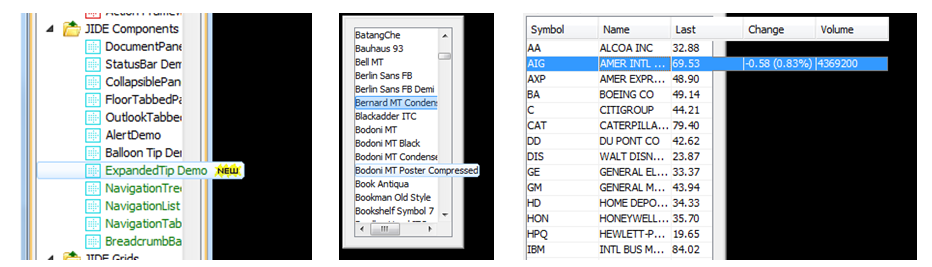
When I started to use IntelliJ IDEA back in 2002, I noticed two simple but neat UI features. The first one is the Searchable feature, an idea that we shamelessly copied (and enhanced), and several years ago made part of the open source JIDE Common Layer. The second feature is where tree nodes or list rows expand to a tool-tip when the text is wider than the scroll pane. We finally implemented this feature by leveraging some source code from the IDEA community edition which was open sourced under Apache license. We implemented TreeExpandedTip, ListExpandedTip and TableExpandedTip to support JTree, JList and JTable respectively. In order to make this feature easier to use, we completely changed the API and also enhanced it so that it can handle any component inside a JScrollPane. In the ExpandedTipDemo, you will find a demo to show a whole image as an expanded tip.
This new feature is part of the JIDE Components product.
Navigation Components - Tree, List and Table
Navigation Components are components that are designed to assist navigation in the user interface. Navigation components are often displayed on the left hand side of the application to help guide users to various items inside the application. Major Java IDEs and many other famous applications such as Microsoft Outlook and iTunes do it this way. The navigation components could be a list, a tree, or a table. However, in Swing, the regular JList, JTree and JTable are not friendly enough to be used for the navigation purpose. For example, in JTree, the selection only highlights the node. If the tree node is very narrow, the selection is barely noticeable. Or the opposite when the tree node is very wide but the tree is narrow - the user can't see the whole node except by scrolling it horizontally (or using the ExpandedTip feature described above). In order to make these components more suitable for navigation, we changed their default behavior and created three subclasses - NavigationList, NavigationTree and NavigationTable. All three have a unique selection/rollover effect. The NavigationTree even has the tree icon fading effect that you can find on Windows 7's File Explorer. If you happen to use JList, JTree or JTable as your navigation components, you can replace them directly with these new components without breaking the existing code.
These new components form part of the JIDE Components product. We also introduced NavigationSortableTable and NavigationTreeTable. Due to the code dependence, these two tables are part of JIDE Grids.
Deep Pan or Thin-and-Crispy Pie Charts?
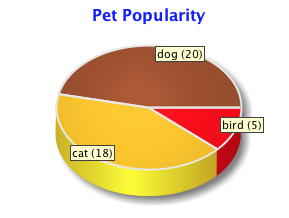
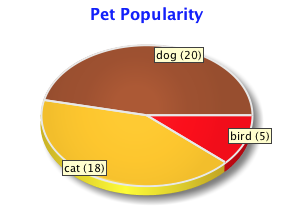
From JIDE 3.3.0, you can choose whether you prefer your 3D pie charts to be deep pan, or thin and crispy:
To configure the thickness of a pie chart call pie3DRenderer.setThicknessRatio() with a thickness value as a proportion of the pie radius (in the above examples, 0.15 and 0.05 respectively).
Step Charts
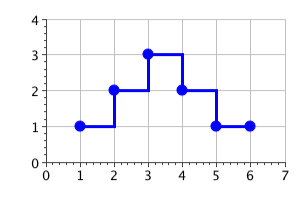
We are also adding support for step charts. It has always been possible to create step charts using the default line renderer, but the latest release includes a specialized StepLineRenderer that draws steps, rather than diagonal lines, to join adjacent points. The renderer assumes the y value remains unchanged until it encounters a new data point, to which it then draws a vertical line to signal an abrupt change. The advantage of the new renderer is that it enables you to draw a step chart from a smaller set of data, which is easier to manage when the data changes. Here is a screenshot of a simple step chart, also showing where the points of the model are located:
Both features above are part of JIDE Charts product.
Google+
We started to use Google+ recently and are quite impressed so far. It is a better alternative than Facebook for geeks like us. That's why we decided to create a Google+ page for JIDE Software. We will announce new releases, new features or components, and welcome related discussions on JIDE or Swing. We will try to keep it in sync with our Facebook page and our Twitter account. See below for links. Please choose to follow or like us if you would like to be kept posted about the latest JIDE developments. And please feel free to interact with us on any one of the three social networks in addition to the JIDE developer forums.
Google+: https://plus.google.com/117950435317935099112/
Facebook: http://www.facebook.com/jidesoft
Twitter: http://twitter.com/#!/jidesoft
August 12, 2011
We are pleased to announce the release of JIDE 3.2.0. There are many exciting new features in this release.
Line Wrapping Support for StyledLabel and Styled TableHeader
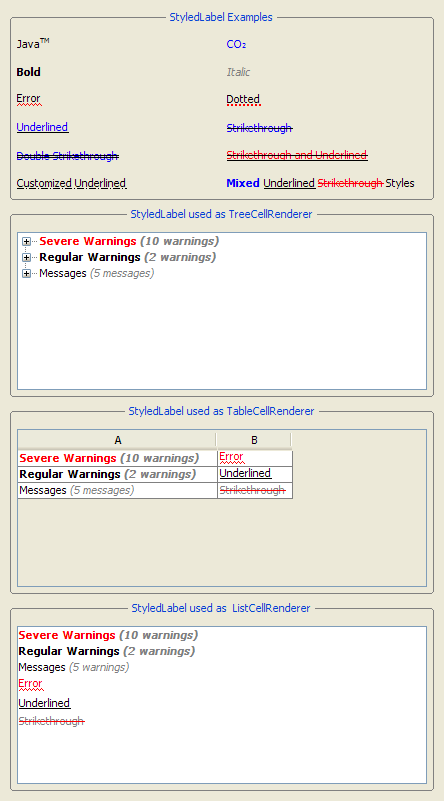
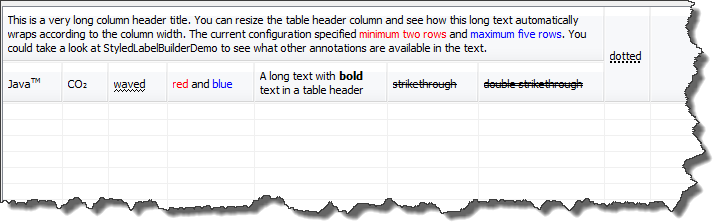
StyledLabel is a very popular component that is available in our open source JIDE Common Layer. It adds styles (foreground, background, line decoration etc.) to plain labels. In the 3.2 release, we have implemented a new line wrapping feature for StyledLabel. By calling setLineWrap(true), the styled label will wrap automatically, without you needing to explicitly add line breaks to the text. You can independently control text layout by setting the preferred, minimum and maximum row counts, as well as the preferred width. To better leverage this new feature, we also enhanced our table header to use a StyledLabel to paint the header text. This means you can now display all kinds of styles in the table header including the line wrap. You want to have multi-line text in your table header? Now you can do it. Please refer to our newly-added WrapStyledLabelDemo and StyleTableHeaderDemo for demos of these features. You must use CellStyleTableHeader or its subclasses to benefit from this feature.
Keep the Native Look of Table Headers
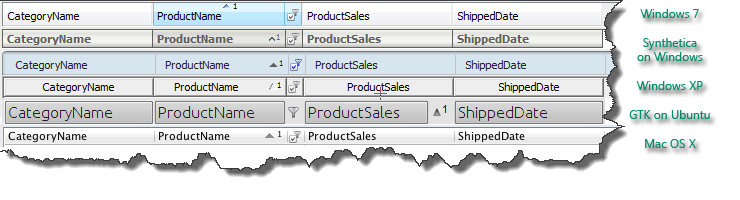
In order to paint a custom header on JTableHeader, you can use the header cell renderer. However, one major problem with the renderer approach is that you lose the native look of the header. On Windows 7, Vista or Mac OS X, there is a nice rollover effect and gradients on the header. As soon as you set your own renderer, they are gone. So it has always been troublesome to place a sort arrow and/or filter icon on the header, implement a nested table header, a group table header or an auto filter table header. In the 3.1 release, we started to roll out a new concept called TableHeaderCellDecorator. The decorator pattern is designed to work with the renderer pattern, not to replace it. The renderer will do the painting first, then the decorators paint some decorations (such as icon, arrows etc.) around it. To avoid overlapping, the decorators can reserve insets so that the renderer will not paint over it. Again, you have to use CellStyleTableHeader or its subclasses to benefit from this feature. Both SortableTableHeader and AutoFilterTableHeader use this feature to paint the sort arrows and the filter button respectively.
Here is a screenshot the table header under different L&Fs with both the sort arrow and the auto filter button.
Marker and Margin Support for JTable, JList, JTree and JTextArea
We have added support for MarkerArea and MarginArea to the CodeEditor. A MarkerArea can be placed next to a vertical scroll bar to display an overview of errors or warnings in a large component. Sometimes only part of the component content is visible in the viewport, but the MarkerArea will always display the whole thing without scrolling. A MarginArea can also be placed next to a component that has a vertical scroll bar. However it scrolls with the content in the viewport. People use it to display row/line numbers, break points, code folding and other status information related to its corresponding row. These two features actually are very generic so they can be used for other large components such as JTable, JList, JTree, JTextArea etc. In this release, we did some refactoring to ensure these components are all supported. Please refer to MarkerSupportDemo and MarginSupportDemo for more information.
Diff for Tables
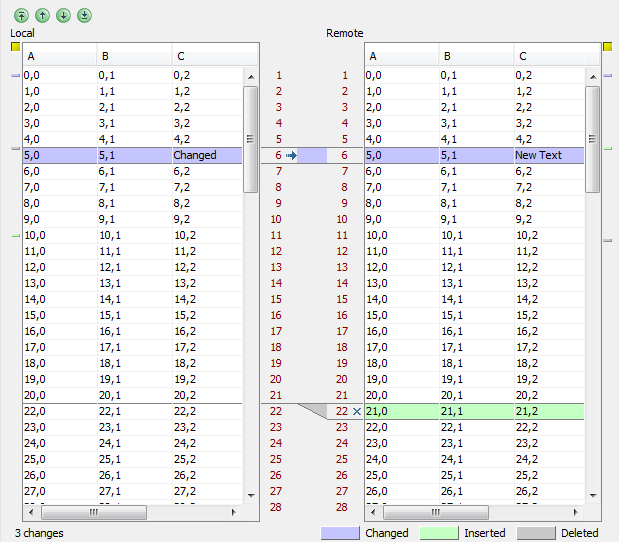
When it was originally introduced, JIDE Diff was a diff utility for just the CodeEditor, but sometimes our users wanted to compare data that was not in text format. What if the data can be represented only as a table? To address this, we have introduced TableDiffPane to support the diff of two tables. It looks and functions similarly to CodeEditorDiffPane, except that you now see two tables instead of two CodeEditors.
Here is a screenshot of the diff pane for tables. You can see both TableDiffPane and the marker/margin area for the table in this screenshot.
Hyperlinks and Buttons in Table Cells
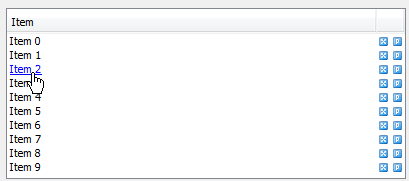
This is probably one of the most-requested features. Swing developers know it is not very easy to implement because JTable uses a cell renderer to paint the cell, with the consequence that mouse events will not be delegated to the cell renderer component. We googled and found some interesting ideas but so far we haven't seen a perfect solution from anyone. I saw an approach that returns a new component for every table cell which of course defeats the purpose of the cell renderer pattern and also hurts performance. Another suggested approach was to delegate mouse events directly, which causes the whole table to be repainted on every mouse movement. Needless to say, we didn't follow any of these suggestions in our implementation.
Please check out the HyperlinkCellDemo for a running demo. The JIDE Grids Developer Guide also covers how we implemented it in detail. Feel free to read it and let me know what you think about our approach.
JDK 7 Support
As you might already know, Oracle has officially announced JDK7. JIDE is committed to supporting two recent major versions of the JDK simultaneously, currently JDK6 and JDK7. This means we will now officially stop supporting JDK5. Even though this release should still run fine on JDK5, from now on we will not invest any extra effort to avoid using, or provide workarounds for, JDK6-only methods/features.
The JIDE 3.2.0 release is the first release officially supporting JDK7. Due to the JDK7 changes (which changed Synth related to UI classes from package local to public), we now have to provide two versions of the same jar, jide-plaf.jar and jide-plaf-jdk7.jar, to support JDK6 and JDK7 respectively. So depending on the JDK you are using, please choose the right jar for your JDK. Note the jide-plaf.jar is the only jar that has two versions. All other JIDE jars will work for both JDK6 and JDK7.
There are also many small features and bug fixes in this release, please click
here for the change log and
here if you want to run the updated demo or download the latest release.
April 4, 2011
We are very pleased to announce the availability of JIDE 3.0 release.
JIDE TreeMap
Please welcome the beta release of JIDE TreeMap: a Java/Swing implementation of the popular treemap visualization technique, invented by University of Maryland, College Park professor Ben Shneiderman in the early 1990s.
Treemaps graphically represent information about objects by dividing the display into areas (typically rectangles) that are proportional to the size of each object. By recursively nesting the areas, treemaps enable quantitative comparisons of attribute values while showing their hierarchical relationships. Typical examples include sales by region and by country, or number of defects by part and year, or budget by department and by division and by company, etc.
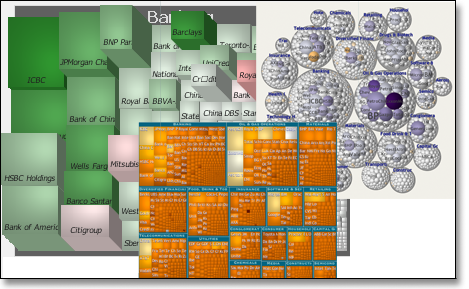
JIDE TreeMap comes with an extended set of features. The visual appearance of a treemap is highly configurable. Size, color, height, and labels can be mapped to any attribute. Many options allow you to further fine-tune the display. In terms of interaction, it provides a zooming interface as well as the possibility to drill-down. Details on demand are available in the form of pop-ups whose content can be freely customized. In addition to the classic treemap layout algorithm, JIDE TreeMap also features a number of alternative layouts such as a squarified variant that harmonizes aspect ratios of the rectangles, or the aesthetically pleasing circular layout. Maps can be rendered flat, or with a pseudo-3D shaded look with customizable light source.
JIDE TreeMap uses the common Swing TableModel as its data model to make integration with existing data sources easier. Adapting table models provided in JIDE Data Grids allow connection to JDBC result sets. A demo example also shows, how to connect a treemap with a live data source. The data can be grouped and aggregated by any combination of categorical attributes. Attribute values can be filtered numerically or by category. JIDE TreeMap is already useful with small datasets, but scales up to 100'000s of data objects.
We are very excited about this powerful new product and, with all these features, we think you will like it too. As we continue to develop this product, we welcome your feedback to help guide us on which new features would be most useful. The beta release is included as part of JIDE 3.0 release. You just need to download the latest evaluation package or the formal release package to get it. There is a JIDE TreeMap Developer Guide in the doc folder to get you started. There are also 7 demos with source code and sample data files in the examples folder, to show you how to use a treemap.
JIDE TreeMap is a separate new product that is included in JIDE Ultimate Suite. Existing JIDE Ultimate Suite customers who still have valid maintenance will get it for free (just need to email us and after for a new license key).
What’s new in JIDE Charts
With this release, we are pleased to introduce a flexible circular gauge component called Dial. Perhaps the most common example of a Dial is an analogue clock, but you might also think of a speedometer, a voltmeter or a fuel gauge. The Dial component presents up-to-date status information in a familiar and easily digestible form, and is therefore well-suited to dashboard and other monitoring applications.
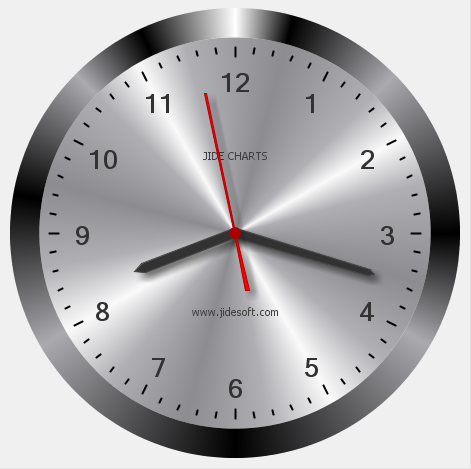
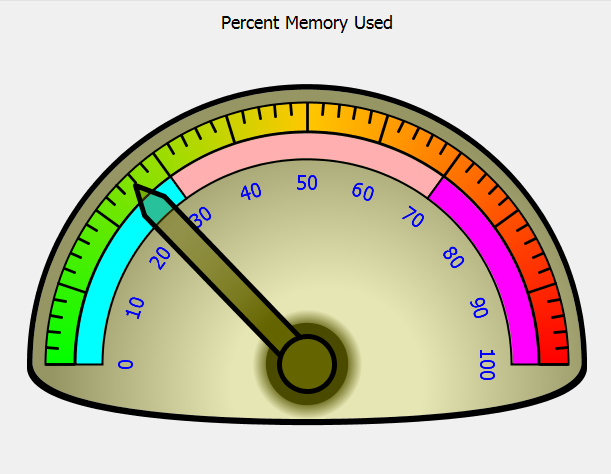
We have also improved core Charts with many new features, such as horizontal area charts, proportional spacing on bar charts, the ability to group stacked bars and a more configurable Legend component.
JIDE Grids
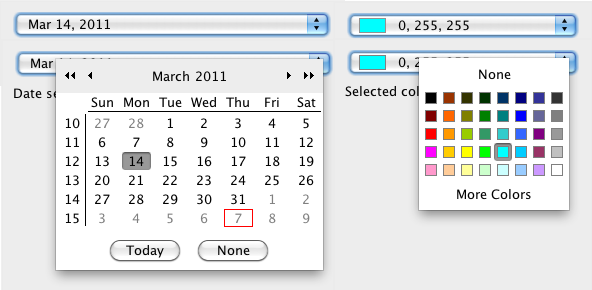
ExComboBox: A replacement for JComboBox. Unlike JComboBox which supports JList as drop down, ExComboBox supports any type of components as the drop down panel, such as table, tree, color chooser, date chooser, font chooser etc. This is the second generation of the AbstractComboBox but ExComboBox looks identical to JComboBox, unlike AbstractComboBox which doesn’t look good on Aqua and some other L&Fs.
February 7, 2011
JIDE 2.11.0 Release and XML format layout for JIDE Docking Framework
XML format layout for JIDE Docking Framework
We use binary format layout from day one when we released JIDE Docking Framework. We did it mainly because we want to hide the format. It has pros and cons. The main cons we are facing right now is it is hard to change the format as we are adding new features to it. So in 2.11.0 release, we introduce XML format layout to JIDE Docking Framework, JIDE Action Framework and DocumentPane, which are three places the same layout persistence mechanism are used. All three use LayoutPersistence interface. We added a method call setXmlFormat(boolean) to LayoutPersistence interface. If you want to use xml, just set it to true. It is also backward compatible. If we find out the layout is binary, we will load it correctly even setXmlFormat is true. It is just when we save, the xml format will be used. By default, xmlForamt property is false so that if you don¡¯t do anything, everything remains.
May 6, 2010
JIDE 2.9.1 Release and JIDE Diff Beta Release
Introducing JIDE Diff
A new product called JIDE Diff is introduced in the JIDE Ultimate Suite. JIDE Diff is a diff/merge component for your Swing applications. It leverages JIDE Code Editor to view text files and provides two-way compare and three-way merge features. See below for a screenshot. JIDE Diff is still in beta. Please feel free to give it a try and let us know what you think.
JIDE Gantt Chart
After a couple of months beta testing, JIDE Gantt Chart is formally released in 2.9.x. JIDE Ultimate Suite customers, as long as you have a valid maintenance status, will get this product for free. You just need to send us an email and ask for a new license key. If the maintenance expires, you just need to renew it and JIDE Gantt Chart will be part of the release that you can download. For non-JIDE Ultimate Suite customers, you can purchase JIDE Gantt Chart separately at $99.99 per single developer license.
JIDE Charts
JIDE 2.9.1 brings two new features to JIDE Charts: a SmoothLineRenderer and the ModelMorpher. When drawing line charts, the SmoothLineRenderer can be used to join the points of a Chart Model with a sequence of curves instead of a sequence of straight lines. The curves are designed to join seamlessly at the points of the model using Bezier curves, giving visually pleasing results. The ModelMorpher makes it easy to display a smooth animated transition from the display of one Chart Model to another. So, the bars of a bar chart or the pies of a pie chart can shrink or grow to new values, or the line of a line chart can "magically" transform from the old shape to the new.
JIDE Pivot Grid
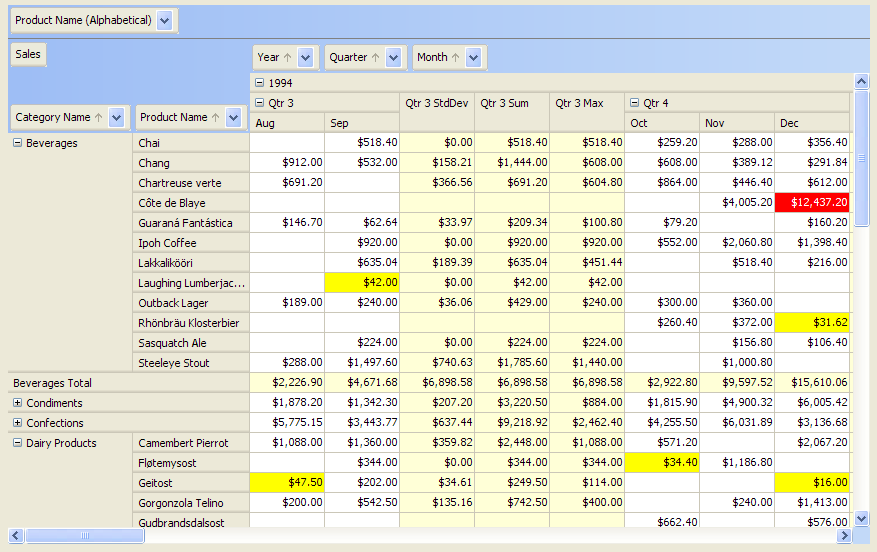
We did a somehow big improvement in 2.9.1. An important class CalculatedPivotDataModel is introduced. Simply replace your existing PivotDataModel with this new CalculatedPivotDataModel, you would be able to get the following new features.
1. Running percentage. This feature has been asked by our users for quite a while. Right click on a field box in DataField area, click on the running summary configuration check box, you would be able to have running percentage, running total, etc. in your PivotTablePane.
2. Average calculation based on visual cells. Have a subtotal type as "average" then compare with the PivotTableDemo and CalculatedPivotTableDemo. You would find that the average calculation now is based on the visible cells instead of the original data.
3. Improved performance while setCacheEnabled(true). CalculatedPivotDataModel would be able to save your time on computing statistics if you enable caching.
4. Affected cells information on data updating. You would also be able to get an event from CalculatedPivotDataModel if you update the original table model. Inside that event, you could find the impacted cell information and do some special renderering as you wish. Please make sure you will invoke CalculatedPivotDataModel#setComputeAffectedCellOnUpdate(true), CalculatedPivotDataModel#setCacheEnabled(true) and CalculatedPivotDataModel#setAutoUpdate(true) to trigger this feature. The reason is that, enabling the feature may hit the performance. Another important interface is PivotValueProvider. With that class, you are able to leave the heavy calculation task running in a separate thread without blocking the UI. Please check out the PivotValueProviderDemo for the implementation. We also provided a TableModelPivotValueProvider in the demo folder FYI.
December 4, 2009
JIDE 2.8.1 Release and JIDE Gantt Chart Beta Release
Introducing JIDE Gantt Chart
JIDE is pleased to announce the beta release of JIDE Gantt Chart. The Gantt chart has been used extensively in project planning and scheduling. It visually represents of the duration of tasks against the progression of time, making it very easy to monitor the project's progress. JIDE Gantt Chart brings the Gantt chart concept to Swing applications. As usual, it embraces the MVC design pattern. It has GanttModel which is the data of this component. It has GanttChartUI and many painters to allow you customize appearance of the Gantt chart on different levels. It not only supports the date/time as the scale, but also supports any numbers as the scale. By leveraging the TreeTable from JIDE Grids, we can display a Gantt chart and a tree table side by side just like Microsoft Project. You can see some screenshots
here.
Here is a list of main features.
- Tree table view and GanttChart view side by side.
- Entry group supported.
- Entry relationship supported.
- Supports GanttEntryRenderer. User can write one's own renderer to render the Gantt entry and the entry group on the GanttChart.
- Supports GanttLabelRenderer. User can write one's own renderer to render the label for the Gantt entry on the GanttChart.
- Supports mouse interactive to change starting date, ending date and completion of the task entry
- Keyboard navigation supported.
- Multiple levels of periods on the scale area.
- Period format support on the scale area.
- Zoom in and zoom out.
- Support both numeric and date as the period
If you work on an application that needs a project scheduling feature, JIDE Gantt Chart can certainly be used as a building block. As we continue to develop this product, we welcome your feedback to help guide us on which new features would be most useful. The beta release is included as part of JIDE 2.8.1 release. You just need to download the latest evaluation package or the formal release package to get it. There is a JIDE Gantt Chart Developer Guide under doc folder to get you started. There are also several demos with source code under examples folder to show you how to use those charts.
November 3, 2009
JIDE 2.8.0 Release and JIDE Charts Formal Release
Introducing JIDE Charts
After several months of hard work and with the help from many beta customers, we are pleased to announce the first formal release of JIDE Charts: a new powerful and flexible charting package that can help the users of your application to understand and explore their data as well as seeing it attractively presented. It supports many different chart types including line charts, scatter charts, bar charts, pie charts, gauges, even candlestick charts. You can see some screenshots over
here. As you would expect, it embraces the model-view-controller pattern and has been designed so that you can easily switch from one visual paradigm to another - like switching from a bar chart to a pie chart - with minimal coding effort. As with JTable, the model layer is defined as an interface - which allows for custom implementations when advanced functionality is required - while the default implementation saves time and is very easy to use.
JIDE Charts supports axes for the display of numerical, time-series or categorical data. The concept of a category is very powerful because a Category instance can be created from any object - they do not have to be Strings or enums. So not only can you use an axis to display qualitative values (for example cold, tepid, warm, hot) but also to differentiate between different individuals in a model-driven coding effort. Axes are defined independently, so you can plot a numerical axis against time-series values, categorical against categorical, or any combination you choose.
The visual appearance of charts is highly customizable with choice of colors, shapes and sizes or custom renderers. However, we have already designed some great looking renderers: the points of an XY plot can be rendered as shiny spheres, the bars of a bar chart can be displayed as glossy cylinders or 3d blocks; and a pie chart can be shown in a 3D style. You can easily switch on the intuitive data exploration gesture of zooming and panning with the mouse - all it takes is a single line of code. JIDE Charts supports multiple y axes and has special provision for displaying large datasets without the usual performance drawbacks. It even supports curve fitting for easily discovering the trends in data.
We are very excited about this powerful new product and, with all these features, we think you will like it too.
JIDE Charts is part of JIDE Ultimate Suite. You can purchase JIDE Ultimate Suite to get it. Or you can purchase JIDE Charts as a standalone product. Or. As usual, existing JIDE Ultimate Suite customers will get the license of JIDE Charts for free. However you still need to send us an email to get an updated license key. For more pricing information, you can visit
here.
In addition to JIDE Charts, we also add several nice features to this release.
A better column resize mode for JTables
JTable has a setAutoResizeMode method which can be used to determine how the columns are resized when the table is resized. However comparing with native table widgets on Windows or Mac OS X, none of the five existing resize modes work exactly right. The problem is the header doesn't expand all the way to cover the whole view port. See the first screenshot below. To solve this issue, we added yet another resize mode - AUTO_RESIZE_FILL. If you use this mode, you will get the same resize mode as a native table. Thanks Ken Orr for sharing the idea in his
blog and permission to allow us using his idea.
Another way doing auto-filtering
We had AutoFilterTableHeader for a long time to support auto-filter feature. It uses a combobox-like drop down list on a table header to select the filtering criteria. However, we received many requests asking us to allow user type the filtering criteria using a text field. We can't do it using a table header as people still wants the familiar table header as it is. So in this release, we introduced a new way to support auto-filter feature by adding a special row to the table header area below the regular table header. You can check out AutoFilterTableDemo to see it in action.
Release Policy
As we mentioned in the last newsletter, we will change our release policy to use two branches. Since then, there are two stable releases 2.7.4 and 2.7.5, and this 2.8.0 release is the first development release. We are still learning how to do it right. As always, we really appreciate your feedbacks to help us serving your better.
September 9, 2009
We are pleased to announce JIDE Charts Beta Release.
JIDE Charts Beta Release
JIDE is pleased to announce the beta release of JIDE Charts: a new powerful and flexible charting package that can help the users of your application to understand and explore their data as well as seeing it attractively presented. It supports many different chart types including line plots, scatter plots, bar charts, pie charts and even gauges. You can see some screenshots
here. As you would expect, it embraces the model-view-controller pattern and has been designed so that you can easily switch from one visual paradigm to another - like switching from a bar chart to a pie chart - with minimal coding effort. As with JTable, the model layer is defined as an interface - which allows for custom implementations when advanced functionality is required - while the default implementation saves time and is very easy to use.
JIDE Charts supports axes for the display of numerical, time-series or categorical data. The concept of a category is very powerful because a Category instance can be created from any object - they do not have to be Strings or enums. So not only can you use an axis to display qualitative values (for example cold, tepid, warm, hot) but also to differentiate between different individuals in a model-driven coding effort. Axes are defined independently, so you can plot a numerical axis against time-series values, categorical against categorical, or any combination you choose.
The visual appearance of charts is highly customizable with choice of colors, shapes and sizes or custom renderers. However, we have already designed some great looking renderers: the points of an XY plot can be rendered as shiny spheres, the bars of a bar chart can be displayed as glossy cylinders or 3d blocks; and a pie chart can be shown in a 3D style. You can easily switch on the intuitive data exploration gesture of zooming and panning with the mouse - all it takes is a single line of code. JIDE Charts supports multiple y axes and has special provision for displaying large datasets without the usual performance drawbacks. It even supports curve fitting for easily discovering the trends in data.
We are very excited about this powerful new product and, with all these features, we think you will like it too. As we continue to develop this product, we welcome your feedback to help guide us on which new features or visualisation types would be most useful. The beta release is included as part of JIDE 2.7.3 release. You just need to download the latest evaluation package or the formal release package to get it. There is a JIDE Charts Developer Guide under doc folder to get you started. There are also 22 demos with source code under examples folder to show you how to use those charts.
Release Policy Change
In the past, we only have one release branch, and all releases were built from this single branch. It is relatively easy for us to maintain just one branch. While people enjoy our fast turnaround for bug fixes and new features, as many users pointed it out, it also brings unnecessary regressions and new bugs. In order to address this drawback, from 2.7.3 release, we will create two branches - the development branch and the stable branch. The developer branch will use 2.8.x as the version number and the stable branch will continue using 2.7.x. We will keep the same release frequency for 2.8.x releases as we are doing right now. But for future 2.7.x stable releases, we will add only minor bug fixes to it and the releases will be less frequent. After a while when the 2.8.x release becomes stable enough, we will make 2.8.x the stable release and introduce 2.9.x as the development branch, and so on. Hope this dual-branch policy will bring the best of both worlds. In the meantime, if you have any suggestions related to this topic, please feel free to let us know.
July 20, 2009
We are pleased to announce JIDE 2.7.0 release and Office 2007 style.
Office 2007 Style
In this release, we introduced a new style that mimics the Microsoft Office 2007 color theme, called Office2007 style. You can see a screenshot of this new style
here. Office2007 style uses a light blue color as the base color that looks very modern and the gradient on most of the components is not a simple two color gradient as in Office2003 style but a linear gradient that uses four colors. Office2007 style looks the best when using Windows Vista LookAndFeel. Since it uses several classes that are only available on JDK6, we will only enable this style when you are on JDK6 and above. Please be aware, if you run your application on Windows Vista using the Windows LookAndFeel and you are using JDK 6 or above, the new Office2007 style will be the default style.
Resizable Dashboard
In this release, we enhanced Dashboard to use JideSplitPane so that the column width can be adjusted. User can resize each column and the width will be persisted as part of the dashboard layout. In the dashboard demo, we also made the gadget to be resizable vertically. Please note this vertically resizing feature is not part of the dashboard core code but as part of the demo since the gadget can be implemented differently in your application. If you prefer your gadget to be resizable, you just need to copy the code from the demo and use it. Thanks Walter Laan for contributing the code.
Introducing JIDE Charts
This is definitely one step further to make JIDE a one-stop solution provider for your company. Many users asked us providing a charting library. JIDE is soon to be launching JIDE Charts: a powerful and flexible charting package that can help the users of your application to understand and explore their data as well as seeing it attractively presented. It supports many different chart types including line plots, scatter plots, bar charts, pie charts and even gauges. The visual appearance of charts is highly customizable with choice of colors, shapes and sizes or custom renderers. However, we have already designed some great looking renderers: the points of an XY plot can be rendered as shiny spheres, the bars of a bar chart can be displayed as glossy cylinders or 3d blocks; and a pie chart can be shown in a 3D style. You can display numerical, categorical or time-series data; and you can easily switch on intuitive data exploration gestures by zooming and panning with the mouse. It even supports curve fitting for easily discovering the trends in data, and has special provision for displaying large datasets without the usual performance drawbacks.
We are very excited about this powerful new product and, with all these features, we think you will like it too. We would like to have a beta phase before the GA release. If you are deciding a charting library for your application, or you are exploring the alternatives to the charting libraries you are currently using, or you just want to check it out for fun, please send sales at jidesoft.com an email saying that you would like to be included in the beta release. We will send you the information to you when the beta is available.
June 15, 2009
We are pleased to announce JDAF 2.2 and JIDE 2.6.6 release.
JDAF 2.2
First of all, the MVC architecture now supports multiple views per model (beta). This is accomplished by adding additional DataViewFactory objects that vend DataViews in response to the same DataModel instance. If the DataModel is primary, the first view vended is considered the primary view and will be installed normally according to the application style. Any other views are considered ¡°auxiliary¡± and require that you implement a DataViewHandler similar to secondary DataViews. However, any number of auxiliary views may belong to either primary or secondary DataModels, as they are just more views on the same model. See the MultiViewDemo for an example. (Note: DockingApplicationFeature and FramedApplicationFeature currently do not support multiple views per model. However this can be accomplished manually by using a DataViewHandler. We are working on this enhancement and it will be released in a maintenance update.)
Next, we have enhanced the behavior of ApplicationFeatures in many ways. The uninstall() method no longer needs to be implemented, the base will now throw a FeatureException to prevent them from being uninstalled at runtime. You may also control whether the feature installation fails passively, just by logging, or whether it throws an Exception (now the default) using the setPassiveExceptionHandling() method. The default is false because failure to install an ApplicationFeature generally means that the application will not run properly. Finally, you can tell GUIApplication to uninstall your feature on exit using setUninstallOnExit(true), which is great if there are resources to clean up when the application closes.
Last to mention are some cool new static usability run() methods in GUIApplication, that magically create an application with minimal fuss. Great for one-offs or testing. There simply is no faster way to create a robust Java application. Check out the
change logs for other additions, enhancements, and bug fixes.
By the way, there is now debug jar available for JDAF which you can download in customer download page. This can be helpful during development.
MarqueePane
A new component was brought on board to JIDE Common Layer. It is a pane that can make any component automatically scrolling, so called Marquee. Need to build a moving stock ticker or a rolling status label? This MarqueePane is a perfect fit. Please make sure checking out MarqueePaneDemo to see it in action.
JideSplitPane
Another nice feature is added to JideSplitPane to allow you to drag the divider regarding its previous/next divider's location. In the other word, a divider can be dragged beyond its adjacent dividers. Docking Framework frames can resized more easily with this new feature.
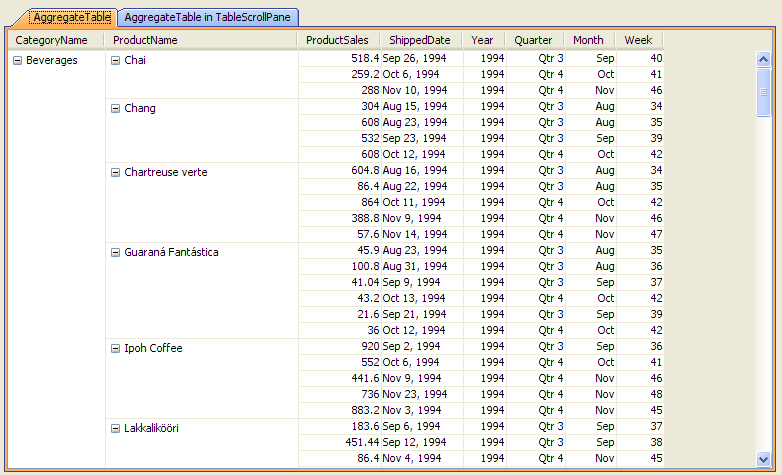
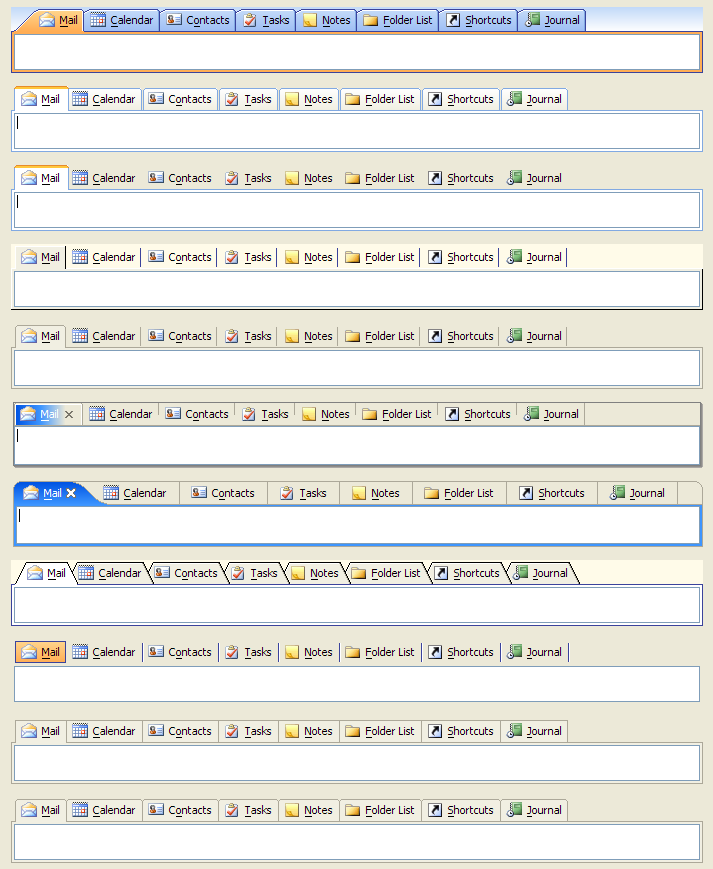
There are also other small enhancements here and there. For example, AggregateTable and AggregateTablePane now have their own Hssf utils to export to Excel. In addition, AggregateTable has AggregateTablePersistenceUtils to allow you to save and load its layout to and from an XML file. OutlookTabbedPane also has OutlookTabbedPanePersistenceUtils to persist its tab order and visible tabs.
April 14, 2009
We are pleased to announce JIDE 2.6 release.
Lucene
As many of you already knew, Apache Lucene is a high-performance, full-featured text search engine library written entirely in Java. JIDE Grids has filtering feature so it makes sense to use Lucene to make the filtering faster. In this release, we introduced LuceneFilterableTableModel and LuceneQuickTableFilterField two new classes to allow you to bring Lucene’s great text searching capability to your own application. Our performance test shows a tremendous performance gain from 1200ms using QuickTableFilterField to 50ms using LuceneQuickTableFilterField when filtering on the same table. Of course, memory consumption is almost doubled but it is your choice to choose faster performance or less memory usage. There is a new LuceneFilterableTableDemo in the demo you can play with.
JIDE Docking Framework
We started working on the focus management of JIDE Docking Framework since 2.5.0 release. Because of the complexity of Swing focus management, there were some serious regressions in several 2.5.x releases. But the good news is after several minor releases, we are glad it gets quite stable in this new release. Here are some of the highlights regarding focus.
1. The active frame will still be active if the focus goes to a component outside the DockingManager (such as a component on toolbar or menu bar).
2. The active frame state is kept when you change the frame state such as toggle floating, toggle maximize/restore and toggle auto-hidden.
3. All dockable frames that were activated before are kept in DockingManager in order. When the active frame is closed, the previous active frame will be activated.
4. When you use multiple docking managers, you have the choice to have one active frame per docking manager or one active frame in several docking managers.
DocumentPane
We introduced floating feature to DocumentPane in this release. Now you can float a document into its own JFrame and move it outside the main JFrame. It will make it easy for users to view multiple things at the same time.
JavaOne 2009
It is JavaOne time again this June. David Qiao, CTO of JIDE Software, will present a technical session for JavaOne 2009 to talk about JTables. JTables and JIDE Grids are used very widely among JIDE customers. So we are very eager to collect some screenshots from your real applications to show what tables are being used in the real world. Just so you know, it doesn’t have to be JIDE Grids. It could be a JTable with some customizations or JXTable or your own table component. David will show those screenshots to the JavaOne audience during his session. We will of course give credit to you. If you have some excellent usages of tables in your application that you are proud of, please email some screenshots to david at jidesoft.com. We are looking forward to hearing from you!
We are on Twitter
Except major releases when we will send out newsletter, we also have many minor and patch releases. We couldn’t find a good way to notify users for those small releases. But the answer is very obvious now as we can use Twitter. You can follow us at
http://twitter.com/jidesoft to get notifications for all our releases. Don’t worry about too many emails as we only do a new release every one to two weeks.
September 30, 2008
JIDE Software introduces JIDE Data Grids and 2.4.0 release.
JIDE Data Grids
JIDE Data Grids is a new product built on top of the JIDE Grids to bridge the gap between the Database and the JTable. The goals of this product are to leverage the Database and Hibernate's filtering and sorting feature to JIDE Grids so that the client doesn't need to download all the records, and to bring the seamless paging support to table models and list models. Without getting into too much details, please continue to the
product page to see features and screenshots. You can run
web start demo to see several demos for JIDE Data Grids. Even though we release it as beta to in order to collect more feedbacks, the qualify and the APIs of the existing classes are stable enough to be used in the production code.
JIDE Data Grids product is included in the JIDE Ultimate Suite. The Single Developer License for JIDE Data Grids is $99.99. It depends on JIDE Grids so you also need to purchase JIDE Grids if you don't have it. You can click
here to find out more pricing information. For all JIDE Ultimate Suite customers, you can use this new product for free after asking us for a new license key. For all other customers, you can purchase this product separately along with JIDE Grids or upgrade to JIDE Ultimate Suite so that you will get the JIDE Data Grids or any future component products we will introduce for free. If you have any other questions, please feel free to email
sales@jidesoft.com.
Filters and CustomFilterEditor
In this release, we bring the filtering support in JIDE Grids to the next level. Previously, the FilterableTableModel is complete but there aren't many user interface components to customize the filters except some simple text filtering and equality-based filtering through QuickFilterField, QuickFilterPane and AutoFilterTableHeader. However, FilterableTableModel can handle way more complex filtering than these simple ones. In this release, we introduced many built-in filters – from simple EqualFilter, LessThanFilter etc to more complex RegexFilter, BetweenFilter to SQL compatible filters such as LikeFilter (as in SQL LIKE statement), InFilter (as in SQL IN statement). With these filters, we are able to build CustomFilterEditor and TableCustomFilterEditor to allow your users defining filters using an easy-to-use user interface. You can refer to CustomFilterDemo.java for such an example. AutoFilterTableHeader "(Custom...)" option also uses CustomFilterEditor instead of asking you to implement it. Hopefully with this release you would never need to write a custom filter using code in most cases.
TableHeaderPopupMenuInstaller and TableHeaderPopupMenuCustomizer
These two classes together provides an extensible solution to replace the existing TableColumnChooser to make it possible for you to custom the popup menu for the table header. GroupTable and AggregateTable use it to allow user to group or aggregate the columns through the popup menu. Any regular JTable also can use it for the column auto-resizing, show/hide columns in addition to any other menu items you want to add to the popup menu.
TableCustomStyleEditor and TableSortItemEditor
There are also a couple new components and features in this release. TableCustomStyleEditor is an interface which allows your user to define cell styles for the table columns. TableSortItemEditor is an interface which allows your user to customize the sort order in addition to clicking on the table header in case additional options are needed. There are also many bug fixes as usual. Please refer to the
change log to for all the new features and bug fixes. Please pay special attention to the "Backward Compatible Issues" session as we deleted many deprecated methods in this major release.
September 16, 2008
We are pleased to introduce JDAF 2.1!
With over 20 new features, many of them of customer requests, we hope you will agree that this release was worth the wait. We have updated the developer guide and rewritten some content to better clarify some JDAF concepts. Please check the change logs to see what has been added, what bugs are fixed, and what API has changed. We'll just mention the highlights here.
Feature-rama
JDAF 2.1 introduces 3 new ApplicationFeatures; FramedApplicationFeature, AutoInstallActionsFeature, GlobalSelectionFeature, and enhancements to DockingApplicationFeature. All of which will make life easier, and more powerful, with GUIApplication.
First off, we have enhanced DockingApplicationFeature based on customer requests and some of our own aspirations. The addDockableMapping() methods that bind a Dockable to a DataView are now based on a DockableConfiguration object. Moving to a configuration object provides greater flexibility. Being a bean, DockableConfiguration becomes a candidate for localization, so that you can easily define dockable properties in resource bundle files using the Resources.bind(). Secondarily, using a configuration object, allows us to freely add more options without bloating the feature interface with more mapping methods. Our first set of options allow you to:
- Define criteria independently from the frame name using setCriteria()
- Define whether a Dockable is installed initially via setAutoInstall()
- Define whether the DataModel origination uses newData() or openData() using setOriginationMode()
With these options you can easily control an MVC Dockable from a NewAction or OpenAction. In addition, we have improved the JDAF data lifecycle integration of Dockables so that you may close the DataModel, when the user clicks a Dockables close box, which optionally triggers a saveData(). Also DataView activation events are now sent when Dockables show and hide. Finally, we provide the ToggleFrameAction, as an alternative to NewAction and OpenAction, so that you may manage Dockables in menus and toolbars easily in a toggle/checked state fashion.
Those working with the JIDE Docking Framework have had the DockingApplicationFeature to take the tedium out of MVC integration into side frames of JDAF windows. But you may not own the framework or need the docking, but still have a GUI that is split into "frames". We pleased to introduce the FramedApplicationFeature. This feature provides a clean MVC interface for defining auxiliary DataViews that live on the sides of your window; perfect for navigation panes, property panes, or informational texts, lists, and tables. FramedApplicationFeature capitalizes on the SplitApplicationUI and gives you the same usability benefits as DockingApplicationFeature, MVC integration, multiple DataViews per side, and data lifecycle integration, just without the docking. Furthermore, FramedApplicationFeature has almost identical usage semantics as DockingApplicationFeature, so if you decide you want docking in the future, your code can be ready in minutes.
AutoInstallActionsFeature can virtually eliminate the need to write menu and toolbar code. By simply adding special Action properties to your actions, this feature can capitalize on JDAFs OS-sensitive menuing subsystem to automatically install your Actions into the standard menus and toolbars, and even create menus and toolbars as needed, all in a OS-compliant fashion. In large applications externalizing menu and toolbar configuration can be an important for future maintenance or packaging flexibility. With this feature you can simply capitalize on the auto resource binding capabilities of JDAF to load the special Action properties from resource bundle files, the net effect being that you could configure your menus and toolbars using resource bundle files! Be sure to read the Developer Guide for the details on this new powerful feature!
GlobalSelectionFeature is a handy feature for those of you who have multiple DataViews that need to be aware of the selection state of objects in the UI.
The Main Event
When an application is large and complex, messaging between models and views can get cumbersome. JDAF manages communication between primary DataModels and DataViews according to pre-wired data lifecycle, but when an application needs to accommodate other models and views, it is up to the user to configure this communication. Traditional Java EventListener techniques, besides being GUI specific, require numerous independent listener implementations and listener support mechanisms while basically providing the same callback functionality. Worse, they heavily couple the two or more communicators. For example, take a GUI with a JTabbedPane. While a JTabbedPane may notify ChangeListeners anonymously (polymorphically), the ChangeListeners themselves need to know the exact identity and location of the JTabbedPane in order to install a listener. Not a problem for this small one-to-one, or one-to-many situation, but what results when you have multiple JTabbedPanes and listeners, a many-to-many relationship, or more likely, many many-to-many relationships, as components are introduced into the GUI. these components could possibly be spread over many windows in different thread contexts and with differing object lifecycles? What results is brittle code with over-exposed object references, leading to memory leaks, NPEs, terse readability, and maintenance nightmares.
Enter the EventManager. EventManager is now available from any DesktopApplication via getEventManager(). The EventManager is there for you to centralize all of your messaging needs in a simple, uniform, and decoupled way. Any object can register an event using addEvent(event). Events are just simple Strings. Any object can publish (fire) said event using the publish(Event, publisher) method. Any object can subscribe (listen) to events using subscribe(event, EventSubscriber), provided they implement the EventSubscriber method doEvent(SubscriberEvent). Notice that none of the publishers or subscribers know of the other! In addition, an event may be optionally associated with an EventContext. EventContexts control how events are sent. JDAF supplies EventContexts that send events in a GUI-specific or thread specific way. They are simple to implement for your own needs as well.
Finally, EventManager is thread-safe and uses WeakReferences so there is no need to unsubscribe for the purposes of garbage collection, freeing you to create a robust, cooperative, and maintainable messaging infrastructure for your application.
Bug Squashing
All known bugs have been resolved, and in particular the one that has haunted our international users; missing icons and strange dialog buttons orders, among its many other odd symptoms. The ultimate problem here was that we where using the variant of the resource bundles for our OS/platform detection, which was a recommended practice at one time. However it ends up being a bad idea, as you cannot specify the variant until you have specified the language and country. Hence, in order to have OS-sensitive resource bundles, all JDAF resource files where specified "en_US_[OS Variant]", causing all other Locales to end up with the default resource bundle and effectively default information, which would cause anomalies on some OS and countries.
We believe in the variant approach, just not in its default Java implementation. So we have turned this "bug" into a "feature" that we call OS Extended-Variant support. By having implemented a custom resource bundle loader, not only will any Locale work now, but you can append the JDAF OS variant to the end of any resource bundle file name, at any reduction level (default + os, language + os, language + country + os, language + country + variant + os), to achieve OS-sensitivity, which is not normally possible with Java resource bundles. Omitting the OS extended-variant in your own localization files simply removes OS sensitivity from the resource lookup chain in the same way that removing the country code or language code would remove those files from the lookup chain. As a side effect, all internal JDAF bundle files have been renamed to the most reduced default form; ex. "resources_WIN.properties", "resources_MAC.properties", etc.
August 26, 2008
We are pleased to announce a new JIDE Icon Set for Mac OS X – another beautiful stock icon set for your Java/Swing applications that follows the Mac OS X icon design guideline. With the introduction of this icon set, we completed the basic icon set with 141 icons in three styles – XP, Vista and Mac OS X.
Mac OS X Icon Set
Mac OS X icon set is another beautifully designed icon set which has a maximum size of 256x256 pixels, making them suitable for high-dpi (dots per inch) displays. These high-resolution icons allow for high visual quality in list views with large icons. Just like in Vista icon set, we tried to use the same or similar design idea as the existing Mac OS X’s icons so that your application looks consistent with any native Mac OS X applications. Now with all three icon sets, your application can use different style icons on different operation systems with just one line code change.
We also decide to run a
promotion to celebrate finishing all three icon sets. We will sell all three icon set as a suite at only $299.99. It is $100 per icon set and each icon set has 141 icons. That’s 70 cents per icon. Please also keep in mind we also provide
custom icon design services to meet your special need, no matter what icon styles you are looking for (Vista, XP, Mac, Linux etc). If you dream to have a consistent user interface with a set of unique icons across all applications in your company, we are right here to help you. We will leverage existing icon element and design from the three icon sets whenever it is possible which will reduce the customized icon design cost significantly.
Icon Service Overview:
http://www.jidesoft.com/icon/index.html
Icon Preview:
http://www.jidesoft.com/icon/preview.htm
Custom Icon Design:
http://www.jidesoft.com/icon/design.htm
Icon Set Purchase:
http://www.jidesoft.com/store/index.php?cPath=33
JIDE 2.3.0 Release
At the same time, JIDE 2.3.0 release is out. In this release, we introduced a new package com.jidesoft.filter which contains a lot of pre-built filters for String, Date, Calendar and Numbers. In addition, we refactored FilterableTableModel and SortableTableModel to allow a totally different implementation to do the sorting and filtering. In the next couple of months, we will introduce several table models and tables around this area to support paging, database, hibernate etc as well as UI panels for table sorting, filtering, styling and grouping. Please stay tune.
July 30, 2008
We are pleased to announce JIDE 2.2.12 release. Although this release is a regular maintenance release, it has a cool enhancement that we would like to inform everyone. A new component? No. For the first time, it is not about a new component or an enhancement to an existing component.
Getting rid of arg0, arg1
It was probably several years ago when I first time noticed the code written by one of our customers has parameters named as arg0, arg1 in a JIDE method. It sounds really strange to me at that time. So I asked him why he named his parameters this way. He said Eclipse automatically named the parameters if using the auto-completion feature. Strange. You think Eclipse should be smart enough to figure out the correct parameter name. So I tried it myself and found out not only Eclipse, NetBeans also names parameters this way. IntelliJ IDEA is slightly smarter. It doesn't use arg0, arg1 but uses s, s1, ... for String parameters, i, i1, ... for int parameters, and so on. However, in JIDE source code or JavaDoc, each parameter was named to represent its exact meaning. For example int rowIndex, String searchingText. If they are replaced by arg0 or s1, the meaning is totally gone. I thought if I kept the variable/debug information in the jide jars, it might work. But it doesn't help. Or maybe I should attach the JavaDoc to JIDE jars as the JavaDoc contains the correct parameter names. It doesn't help either. It turned out the only way is to attach the complete source code zip file to the JIDE jars. Our source code license customers can benefit from it but not for all non-source code customers. Finally, we decided to introduce something to address this issue – the source code stub.
The source code stub is converted from the original source code using a doclet. The stub has only the public/protected methods and fields definitions, all JavaDocs, but no method body, nor private methods or fields. It sounds like a strange idea as this file won't even compile. But it did the magic. You will never get arg0 or s1 parameter names again in your code. You can click on this
introduction page for more information. The source code stub zip file is made available to all JIDE customers for free in 2.2.12 release. Give it a try today. You will love it.
JIDE group on LinkedIn
Marco De Angelis, a long-time JIDE user, emailed me the other day and asked about setting up a LinkedIn group for JIDE enthusiasts. And he did. The group is called "JIDE Enthusiasts and Professionals". Once you join the group, you'll be able to search, find, and contact fellow group members in addition to the hundreds of thousands of users you can reach through your extended LinkedIn network. You can accelerate careers/business through referrals from the group members. For people who talked with you over JIDE forums, you can now see their complete professional profile.
The link to join this JIDE group:
http://www.linkedin.com/e/gis/152780/31601A0434DC. All licensed JIDE developers are pre-approved for this group.
June 30, 2008
We are pleased to announce a new JIDE Icon Set for Windows Vista – another beautiful stock icon set for your Java/Swing applications that follows the Windows Vista icon design guideline.
Vista Icon Set
We released our first stock icon sets a while ago and now here comes the second icon set that follows the Vista icon design guidelines. The Vista style is more realistic than illustrative, but not quite photorealistic. Icons have a maximum size of 256x256 pixels, making them suitable for high-dpi (dots per inch) displays. These high-resolution icons allow for high visual quality in list views with large icons. We tried to use the same design idea as the existing Vista's icon so that your application looks consistent with any native Vista applications. You can preview both icon sets here.
This Vista icon set is built by our graphic designers with the cooperation from our developers of JIDE component products. By combining both the artistic talent and the logical thinking talent together, our icon set is designed with developer in mind which makes it extremely easy to use in any software applications, especially for Java applications which all our existing JIDE customers and users are building. It even comes with a jar file that you can put into your class path and start to use those beautiful icons right away using IconSetManager class from the open source
JIDE Common Layer.
The price for this Vista icon set is at a very affordable $249.99 for the Java version which is less than $2 per icon even though some icons took as high as six designer hours. Please also keep in mind that we provide
custom icon design services to meet your
special need, no matter what icon styles you are looking for (Vista, XP, Mac, Linux etc). If you dream to have a consistent user interface with a set of unique icons across all applications in your company, we are right here to help you.
Icon Service Overview:
http://www.jidesoft.com/icon/index.html
Icon Preview:
http://www.jidesoft.com/icon/preview.htm
Custom Icon Design:
http://www.jidesoft.com/icon/design.htm
Icon Set Purchase:
http://www.jidesoft.com/store/index.php?cPath=33
June 17, 2008
We are pleased to announce JIDE 2.2.8 release which provides fully support for Synthetica LookAndFeel.
Synthetica and JIDE
JIDE Software and JAVASOFT Software Engineering are glad to announce the support between JIDE and Synthetica product lines. JIDE is one of the most popular open source and commercial Swing component libraries. Thousands of companies are building their Swing applications on top of the frameworks and components provided by JIDE. Synthetica is a popular, customizable, enterprise look and feel. In past several months, developers from the both companies worked very hard together to make it possible to use JIDE components under Synthetica L&F. With the latest releases, all custom JIDE components will automatically get a nice style that is compatible with the style of the currently selected Synthetica theme. No extra code is need as long as you add syntheticaAddons.jar and jide-synthetica.jar to your class path, set the L&F to Synthetica and install JIDE extension just like before.
Please visit JIDE download page and
Synthetica download page to download the latest JIDE and Synthetica (v2.7.2 and later) / SyntheticaAddons (0.9.7 and later) and give it a try yourself.
You can find some nice screenshots of our demos under various Synthetica themes from here.
TitledSeparator, JideSplitPane and FolderChooser
There are also a couple new components and features in recent releases. TitledSeparator is a new component which can has a title text and a separator. It can be used to group the components inside a container. We created PartialEtchedBorder along with TitledBorder for this purpose but you have to use it as a border. TitledSeparator is a component that can be added to any container. So you can decide which one is better in your case. The one touch button feature is added to JideSplitPane, a multi-split split pane. Many users asked for this feature and we finally got a chance to add it in this time. We also added a navigation field with IntelliHint support in FolderChooser. So instead of navigating through the tree to find a folder, you can also type in the folder and press ENTER to accept it without expanding the folder tree.
April 15, 2008
We are pleased to announce the official release of the JIDE Desktop Application Framework (JDAF), version 2.0. If you've been waiting for the kinks to iron out before jumping into JDAF, we encourage you to give it a try!
JIDE Desktop Application Framework
JIDE Desktop Application Framework, or JDAF in short, is a ground-breaking platform for developing truly cross-platform desktop applications in Java. Decades of application development experience, extensive R&D into developing trends, and OS Guidelines studies have been engineered into a modern solution that will not only save significant development time and resources, but will bring order, quality and an unprecedented level of OS integration to your desktop projects.
JDAF is based on a powerful "Managed Application" technology which manages the entire application lifecycle, ensuring that you need only focus on application-specific features. JDAF provides out-of-the-box functionality such as a Model-View-Controller architecture for data/view management, unique resource bundle features, robust file handling, and 30+ application-related Actions handling single or multiple documents, editing, and window management. Additionally, with a managed UI your users will experience a native-feeling and intuitive application because of our OS Guidelines-driven UI implementing standard dialogs, menus, icons and toolbars. Top it all off with printing and help integration features, and even a console application API, and you have the most powerful yet easy to use desktop application platform available.
For more information, please visit the
JDAF product page or the self-guided
JDAF tutorial.
NetBeans Plug-In
We are pleased to announce NetBeans users that there is now a JDAF Application Plug-in available. Simply add the http://www.jidesoft.com/netbeans/updates.xml to as a new Update Center in Tools - Plugins - Settings dialog of NetBeans and follow the steps to install JIDE JDAF Application Wizard plugin. It will be available on NetBeans plugin portal shortly. Once you installed it, you can go to the new project wizard to new a JDAF application just like the one for the JSR-296 application framework. If you plan to evaluate JIDE or JDAF, there are NetBeans plugins for those two as well.
Database Demo
Besides minor functionality enhancements, general stability and final API adjustments, this version includes a database application demo. It is actually a popular "Address Book Demo" from Sun. We have refactored it to use JDAF. We thought this would be a good example not only of facilitating a DB application, but of both migration and seeing how using JDAF brings a level of robustness to a plain old Java application.
Thanks!
We would like to thank all our early adopters for your valuable input and encouragement during this beta cycle. We have many enhancements and sister products coming, so we can all look forward to an exciting future with this product.
April 8, 2008
We are pleased to announce 2.2.3 release of JIDE component products.
BigDecimal support in JIDE Pivot Grid
JIDE Pivot Grid has received attentions from many customers recently. People realized how useful it is and started to use it to bring some cool data analysis features to their applications. In last release, we improved the performance of pivot table as people use it to load a huge number of rows. In this release, we brought BigDecimal support to pivot grid as they found double data type doesn't provide enough precision in their application. In order to use it, all you need to do is to use BigDecimalSummaryCalculator for the summary calculator.
Thanks lievendoclo who helps us implementing this feature. We would also like to say thanks to a few other active users on the forum such as jeffng, michael.rasschaert, mmdeveloper, mbruni, hbillings, Walter Laan and many others who contributed to JIDE Common Layer and other JIDE products, helped answering other users questions and gave great ideas and suggestions to us to make JIDE better. As we mentioned many times before, we need your help as there is no way we can do everything by ourselves.
CreditCardTextField
This is a new component based LabeledTextField. It allows user to input a credit card number and validate on fly. Once validated, the credit card issuer's logo will be displayed next to it. It supports major six credit card issuers and it also supports masked mode to hide certain digits when the field is out of focus. As we have many customers in the finance industry, we hope you will find this component useful.
There also a few cool new features. For example, CellStyleCustomizer is added to CellStyleTable to make it easier for you to extend CellStyle to add your own style. AbstractComboBox now supports JSpinner as the editor. NumberSpinnerComboBox and DateSpinnerComboBox are two such examples. Please refer to the
change log to for all the new features and bug fixes.
Trainings
We understand that learning a new API library such as JIDE is not easy. Nothing is better than having someone who wrote the library to guide you through the learning process and answer the questions you may have face to face. So we plan to schedule a few public training sessions over the next couple of months. To make it easier for you to attend, we plan to hold them in several major metropolitan areas such as San Francisco, San Jose, New York City, Boston, Houston, Chicago and San Diego. There are three course - JIDE Grids and JIDE Pivot Grid, JIDE Docking and Action Framework, and JIDE Desktop Application Framework. Each course will last one day. The cost will be roughly $500 per course and we will accept maximum 10 people per session. If you are interested in any of the course, please contact
services@jidesoft.com and mention the course name, the preferred location and the preferred date if any so that we can coordinate. If your company have 5 or more people who would like to be in the training, we can also arrange a private training session. For more details, please refer to the
training page.
Yes, We are Hiring!
March 20, 2008
We are pleased to announce JIDE Icon Set – a beautiful stock icon set for your Java/Swing applications.
JIDE Icon Set
Here is the exciting news for all developers who hate being forced to design icons (such as most Java developers here). We release our first stock
icon sets with 141 professionally designed icons. This icon set is built by our graphic designers with the cooperation from our developers of JIDE component products. By combining both the artistic talent and the logical thinking talent together, our icon set is designed with developer in mind which makes it extremely easy to use in any software applications, especially for Java applications which all our existing JIDE customers and users are building. It even comes with a jar file that you can put into your class path and start to use those beautiful icons right away. The price for this icon set is at a very affordable $149.99 for the Java version which is roughly $1 per icon. At the same time, we also introduced
custom icon design services to meet your need. If you dream to have a consistent user interface with a set of unique icons across all applications in your company, we are right here to help you.
Icon Service Overview:
http://www.jidesoft.com/icon/index.html
Icon Preview:
http://www.jidesoft.com/icon/preview.htm
Custom Icon Design:
http://www.jidesoft.com/icon/design.htm
Icon Set Purchase:
http://www.jidesoft.com/store/index.php?cPath=33
JIDE 2.2.2.02 Release
Along with the icon set release, we also have a minor JIDE component product release to support it. JIDE Common Layer added two new classes IconSet and IconSetManager to support the usage of icon set in any Java applications. As JIDE Common Layer is open source, even you are not JIDE component customers, you can still purchase JIDE Icon Set and use it with open source JIDE Common Layer.
In this release, we introduced an easy way to do row or column stripes using CellStyleTable. All you need to do is to call table.setCellStyleProvider(new RowStripeCellStyleProvider()) in this new release. We also
copied an idea from Vista where we resize the column to fit the visible rows only when user double clicks on between the table columns on the table header. It is optional. If your table is huge and autoResizeColumn call takes a long time, you may consider this option.
Another exciting news is we added as many as 48 different locales for some properties files. Thanks Mike and his company contributing all those localized properties files. As there are too many properties, we decided to move all the properties files to jide-properties.jar in the this release. If you need localized version, you will need to include jide-properties.jar in your class path.
Please refer to the
change log to for all the new features and bug fixes.
February 27, 2008
JIDE Software announces JIDE 2.2.2 release and JDAF 1.2.2 release.
We are pleased to announce another major release JIDE component products as well as JDAF.
NavigableTable and NavigableModel
Similar to the design pattern we did for StyleModel and SpanModel, NavigableModel is yet another model interface which allows user to customize the cell navigation using keyboard and/or mouse. If your user is heavy keyboard user, this model will ease their efforts by skipping unnecessary cells when they press tab key.
PivotDataModel Performance Tuning
JIDE Pivot Grid gets more and more popular. People start to use it to display millions of rows where performance becomes an issue. In this release, we introduced several performance tweaks to make it running more smoothly. For example, we no longer calculate possible values until user clicks on the filter drop down button, we cache hashCode calculation, etc. We also did a benchmark and post the result in
JIDE Pivot Grid Developer Guide. Please feel free to do your own benchmark and let us know the result. We promise to make our pivot data calculation engine as fast as possible.
Icons
We would also like to make a pre-announcement of a coming feature. It is not directly related to Swing components but still related to user interface design. As we all know, icons are vital to a nice-looking user interface. We will release our first set of stock icons in about three weeks. It will have a total of 141 professionally designed icons. It is not going to be free but will be at a very affordable $149 per set which is roughly $1 per icon. For Java developers, they will be extremely easy to use as we will integrate it with our IconsFactory class and will also introduce a few other helper classes allowing you to use any icons at any sizes using just one line of code. You can check out more details
here. We will also introduce custom icon design services to meet your need.
Deprecated Methods Removed
We finally decided to remove deprecated methods which are there for many past releases. They are quite annoying to many users especially new users as the method names are similar and they don't know which one to choose when using intellisense. For existing customers, there could be compile errors if you are still using those deprecated methods. You need to open JIDE 2.2.1 or JDAF 1.2.1 javadoc of those methods to find out what replacement methods are. But don't worry as most of them are very trivial to fix. If you need any help on this, feel free to let us know.
There also a few cool new features. For example, AutoRepeatButtonUtils will make the button periodically triggering the action listener if user presses and holds mouse button, IconsFactory's createRotatedImage will create a rotate image from an existing image and it works with any degree. Please refer to the
change log to for all the new features and bug fixes.
December 17, 2007
JIDE Software introduces JIDE Desktop Application Framework (JDAF) 1.2 beta release.
We are pleased to announce the second major update to JDAF. With over 60 new features and improvements, an updated developers guide and greater stability, you’ll find JDAF even more powerful and easier to use than ever. See the changes
here.
Improved MVC
JDAF now supports the notion of primary and secondary DataModels and DataViews. This is controlled by the
primary property in the DataModel. If primary is false, the DataModel is considered secondary and is treated outside the normal data cycle. You must add a
DataViewHandler for that DataModel type which will allow you can install the DataView anywhere in a window.
Split Application Style
The new
SPLIT_APPLICATION_UI GUIApplication style facilitates split panes on all four sides of a JDAF window. These panes can be used for MVC (using a DataViewHandler) or straight Swing Components, such as navigation panes, help views or other static components that need to share the window with the primary DataViews.
Improved Docking Framework Integration
The new
DockingApplicationFeature facilitatesfull integration of the JIDE Docking Framework into the JDAF MVC architecture, providing an alternative to conventional usage. There is also improved default handling of layout persistence which will load and save a default layout automatically. See the new DockedTextEditor2 demo.
Improved Windowing
It is sometimes necessary to know when a window opens and closes outside of the DataView architecture. For example; to install custom Components into JDAF managed windows or clean up before a window closes. We have added a new
WindowCustomizer for this purpose. Note that if you have code that uses
setNewDataOnRun(false) and that uses the Docking Framework, you will want to migrate your code to use the WindowCustomizer. See a migration guide
here.
Many More Features…
See the
change log to for all the new features, bug fixes, and API changes. Be sure to convert from deprecated methods as they will be removed at release time. We realize this is a large and ambitious product with an extended beta period. Thank you all for being patient and for all your great feedback! And if you haven’t jumped into JDAF, now is a great time! Enjoy!
November 1, 2007
JIDE Software introduces GroupList, DualList and AggregateTable into 2.2.1 release.
GroupList
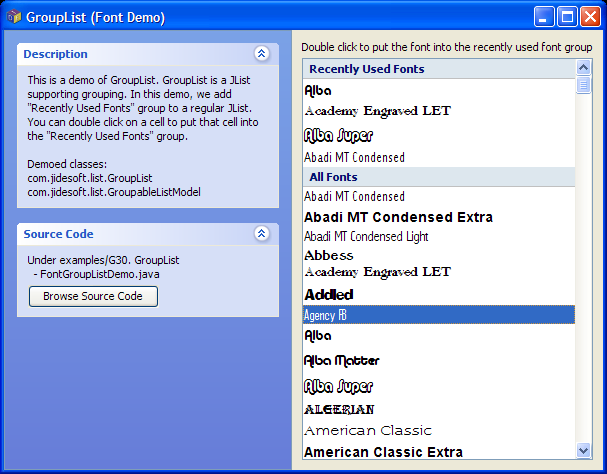
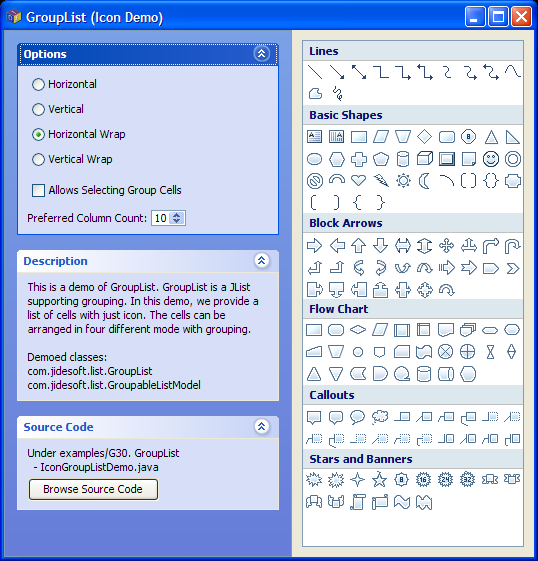
GroupList is a JList supporting grouping. It allows you to organize a large list of items into different groups. It also support four different layout orientation to best utilize the available space. You can see screenshots
here and
here.
DualList
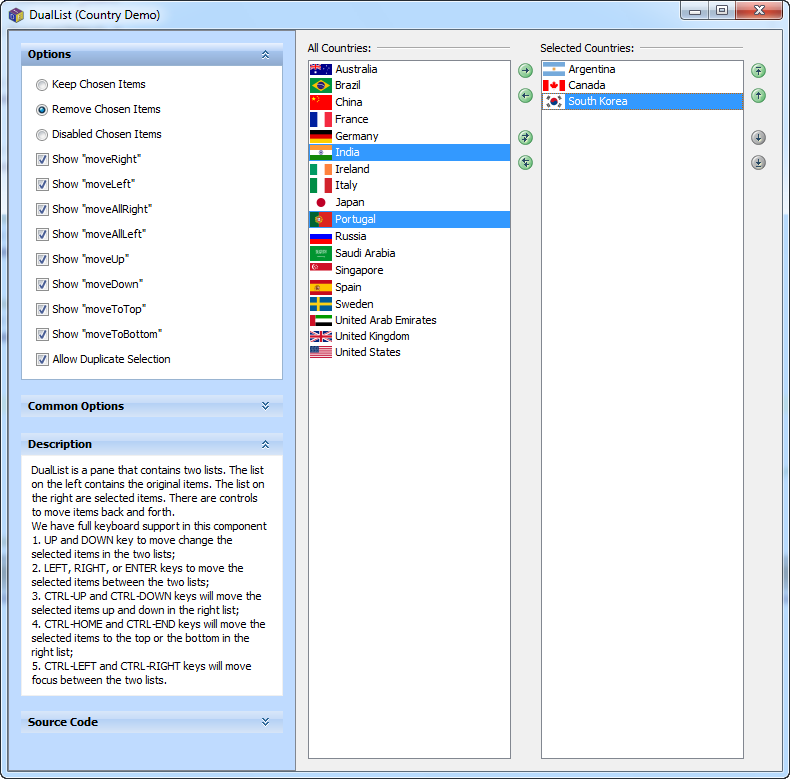
DualList is a pane with two JLists and several buttons. User can select items from the list on the left and move them to the list on the right, and vice versa. User can also reorder the items in the right list. It is a simple but very useful component, which was asked by our customers for a long time. We are glad to make it into this release. You can see a screenshot
here.
AggregateTable
AggregateTable provides a way to aggregate a table model with duplicated values using TreeTable-like expandable cells and cell spans. Different from TreeTable where you have to rewrite your table model using Row interface, you can use any table model with AggregateTable. Again different from TreeTable where there is only one column that is expandable, AggregateTable allows any number of columns to be expandable. GroupTable is also a table that can aggregate rows. But different from GroupTable which inserts extra rows for group rows, AggregateTable doesn’t add any rows. It keeps the exact number of rows as in the original table model but provides a clearer view of the same data. If needed, AggregateTable can even display summary statistics for the aggregated rows just like pivot grid. It can do that simply because it uses PivotDataModel as the calculation engine. You can see a screenshot
here. AggregateTable is part of JIDE Pivot Grid.
October 12, 2007
JIDE Software introduces JIDE Dashboard, BalloonTip into 2.2.0 release, and JDAF 1.1 beta.
JIDE Dashboard
JIDE Dashboard is also known as customizable home page. It allows your users to drag and drop to put any components on it. Imagining your application deals with real time data, there are tons of information you want to show to your users (such as a stock trading or a network device monitor application). There certainly isn’t enough space to show all of the information. It’s also hard to guess what users really want to see. So how about let user choose what to display? That's where you need JIDE Dashboard. Please continue to the
product page to see product features and screenshots.
You can run
web start demo, scroll to the end of the navigation tree to see a few demos for JIDE Dashboard. The Single Developer License for JIDE Dashboard is $99.99. You can click
here to find out more pricing information. JIDE Dashboard is included in JIDE Ultimate Suite. For existing JIDE Ultimate Suite customers, as long as you have valid maintenance, you will receive this new product for free (again). You still need to ask us for a new license key though. For all other customers, if you want to use this product, you can purchase this product separately or upgrade to JIDE Ultimate Suite so that you will get JIDE Dashboard or any future component products we will introduce for free. If you have any questions, please feel free to email
sales@jidesoft.com.
BalloonTip
We introduced a new component called BalloonTip to JIDE Components product. As the name indicates, BalloonTip uses a balloon shape popup. It also has a nice perspective or drop shadow. Instead of using boring rectangular tooltips, you can use BalloonTip to display warning or error message, help information, hints to make it more interesting and attractive. Take a look at a screenshot
here. I am sure you will find it useful.
JDAF 1.1 and ActivityManager
While Java has always supported a threaded model, threaded behavior is more important than ever in our emerging parallel-processor environments. For desktop developers threading involves notorious challenges like thread management, input blocking, UI interaction and feedback. SwingWorker is a popular solution, JSR 296 Tasks, and various other community solutions abound. But with the lack of a managed architecture few provide a cohesive and readily productive solution. In addition to increased stability, we are proud to release JDAF 1.1 beta with the introduction of the ActivityManager. The ActivityManager makes performing threaded tasks as easy as implementing an Action. Your GUIApplication now has an ActivityManager that provides a context for launching, inspecting, and managing one or more Activity implementations. Launch Activities from Actions or manually to perform all kinds of tasks. Global and Activity-scoped ProgressListeners separate thread logic from EventDispatchThread interaction providing a clean Model-View for your threaded tasks in a Swing-friendly manor. A robust set of ProgressListeners provide powerful OS guidelines-influenced UI blocking and feedback in an automated, integrated, and maintenance free manner. If you've been waiting to get into JDAF, now is the time. This is the last beta release. Updates like this won't be available for free once we go live.
August 28, 2007
JIDE Software introduces JIDE Feed Reader and 2.1.3 Release
JIDE Feed Reader
JIDE Feed Reader is a component that can subscribe to RSS feeds. You might think RSS feed equals to blog, so why do I need another blog reader?! In fact, RSS feed is used more widely than blogging. We made this product to enable the usage of RSS feed technology in any Swing applications so that you can use it to push product release announcements, critical updates/patches, special messages to your users automatically. Please continue to the
product page to see product features and a screenshot.
As I mentioned earlier, JIDE Feed Reader is included in JIDE Ultimate Suite. So good news for all JIDE Ultimate Suite because you can use this new product for free. We didn’t increase the developer license price for the JIDE Ultimate Suite either after adding this product, which is good news for all other people who want to purchase or upgrade to JIDE Ultimate Suite.
A special think to people who created Informa project (Home page, LGPL’ed open source project). JIDE Feed Reader leverages this great RSS library so that we can focus on the UI component side of the implementation.
You can run
webstart demo to see a demo of JIDE Feed Reader. The Single Developer License for JIDE Feed Reader is $49.99. You can click
here to find out more pricing information. For existing JIDE Ultimate Suite customers, as long as you have a valid maintenance, you will receive this new product for free. You will still need to ask us for a new license key. For all other customers, if you want to use this product, you can purchase this product separately or upgrade to JIDE Ultimate Suite so that you will get JIDE Feed Reader or any future component products we will introduce for free. If you have any questions, please feel free to email sales@jidesoft.com.
Overlayable
We introduced many cool "–able" features in past, such as Searchable, Resizable, Flashable. Just like Searchable to make any component searchable, Resizable to make any component resizable, the Overlayable is to make any component overlaying over another component. With this neat feature, you can do many cool things such as providing a validation error indicator, progress indicator, help message etc. Take a look
here, you will see several usages of this feature.
What makes it even greater is the Overlayable is part of JIDE Common Layer, which means everybody can use it for free.
Real-time Pivot Grid
JIDE Pivot Grid didn’t support real-time data updating very well. In the other word, if the actual data was changed, you had to call calculate() method manually on PivotDataModel which could be an expensive call if your data size is huge. This situation is improved in this release. Now the JIDE Pivot Grid supports real-time data updating. If the underlying table data is updated (and fires cell updated, row inserted/updated/deleted event), we will listen to those events and update the pivot data incrementally. If you are using pivot table in display some real-time data, you will notice the difference immediately simply calling PivotDataModel#setAutoUpdate(true) to enable this feature.
July 23, 2007
JIDE Software introduces JIDE Desktop Application Framework
JIDE Desktop Application Framework
After years of research and development, we are proud to release the JIDE Desktop Application Framework into public beta. JIDE Desktop Application Framework (JDAF) is a foundation for developing truly cross-platform desktop applications in Java. JDAF provides industry first concepts such as a
Managed Application UI which provides an OS Guidelines-driven application host. From the developers perspective, the UI is managed, so all you need to do is create content and let the services of the framework manage windows, dialogs, menus, and toolbars. An MVC architecture facilitates UI and Data binding. From the users point of view, they will experience an application that feels native and intuitive on their platform because we've taken the next step in Look and Feel fidelity by addressing the
application experience portion of OS guidelines specifications. And like Swing, you get this for free just by using the framework. JDAF also includes a console application API which facilitates making command-line applications a snap. This product also provides us a platform from which to release new and more specialized types of application frameworks and add-ons in the future. You can read the
product page for the list of features.
This is a first run beta so we look forward to your valuable feedback! Just keep in mind that, while we believe JDAF is very simple to use, it represents an ambitious technology with some novel features. The
Developers Guide is thorough and should help you to understand the product. This documentation has a new format with a table of contents which we hope you will find easy to use. It includes a migration guide at the back as well. We have also prepared a
tutorial page to help you quickly get into the basics of the framework. We will be adding on to this page in the future. We have also developed a JDAF Application Wizard that will frame-out application source for you. You can run a
web start demo to see the wizard in action.
The Single Developer License for JIDE Desktop Application Framework is $299.99. You can go to the
purchase page to find out more pricing information. If you have any questions, please feel free to email
sales@jidesoft.com.
July 2, 2007
JIDE Software introduces JIDE Code Editor in 2.1 release
JIDE Code Editor
After months of development, we are finally getting ready to release JIDE Code Editor to public. JIDE Code Editor is a text editor for source code of computer languages. If you are looking for an editor that can be used to view and edit source code of an existing computer language or a new language you created, this is the right component for you. You can read
the product page for the list of features.
Before this public release, we did beta testing among a few customers for about two months. As it is a relatively large component, we have decided to still mark it as beta in this release so that more and more people can try it out and give us feedbacks and suggestions. Hopefully after a couple of release cycles, we will reach the formal release.
You can run
web start demo to see the demo of JIDE Code Editor. In addition to the three examples just for JIDE Code Editor, we also used CodeEditor to browse the demo source code in all the demos. You can access it from the options panel of each demo and click on the browse source code button.
The Single Developer License for JIDE Code Editor is $249.99. You can go to
the purchase page to find out more pricing information. For existing JIDE Ultimate Suite customers, as long as you have a valid maintenance, you will receive this new product for free. You will still need to ask us for a new license key. For all other customers, if you want to use this product, you can purchase this product separately or upgrade to JIDE Ultimate Suite so that you will get JIDE Code Editor or any future component products we will introduce for free. If you have any questions, please feel free to email
sales@jidesoft.com.
What's Next
People have been anxious about JIDE Desktop Application Platform (JDAF) as we announced on DesktopMatters conference that it will available soon. Just so you know, we are making the final touch on it before publicly releasing it. You will hear from us soon.
The other product we are about to release is
JIDE RSS Feed Reader. This component allows you to subscribe to any RSS feeds inside your application. We know that weblogs use RSS so you can use this component to read weblogs. But that’s not the reason we make this component. We made this component mainly because we want you to use this component to keep your users updated about your new product releases, security alerts, important patches etc. We will release it in a few weeks as part of 2.2 release. This component will again be included in JIDE Ultimate Suite just like JIDE Code Editor.
JDK Version
As mentioned in the previous newsletter, the 2.1 release is the first release we use JDK5 with target set to 1.5 to compile and generate the jars. If you are still on JDK1.4.2, please find another zip package on the download page which contains the JDK1.4.2 compatible jars. We used Retroweave to generate those jar files.
May 2, 2007
JIDE Software announces JIDE Common Layer open sourced and 2.0.0 release
Open Sourced, Finally!
After more than a month preparation, we finally open sourced JIDE Common Layer at
java.net. For those who heard this name for the first time, JIDE Common Layer is a layer above Java/Swing/AWT. When we first started working on JIDE components, we found many missing or wrongly implemented features in Swing/AWT. So we created such a layer and built all JIDE products on top of the layer. As time goes by, this layer grew into a module with over 100k lines of source code and over 30 components. Since most of the features we provided in this layer are so commonly used and probably should be included in Swing anyway, we decide to open source it so that everyone can use it and contribute to it.
We decided to use dual-license to open source this project. The open source code license we use is GPLv2 with classpath exception. For most open source projects, as long as GPL-compatible, you can choose this license. For all commercial companies including existing paid customers, you can choose the free commercial license which has the same license terms as the current software license we are using except it is free. Please refer to LICENSE file in the project release for more information and FAQ.
Please download the source code of JIDE Common Layer and give it a try today. You can run
webstart demo to see the demo of all components that are open sourced. For existing JIDE customers, there is basically no change. The product release will still have jide-common.jar included just like before except you can now find the source code of this jar under src subfolder.
New Features
The main new feature in 2.0 release is
GroupTable. If you ever saw Outlook Inbox, you will know what GroupTable is. Please run GroupTableDemo to see it in action. Just so you know, GroupTable feature is still in beta at the moment as there are many features we would like to add to this component because making it final. Another cool feature is
FilterableTreeTableModel. It can add filter feature to a TreeTableModel.
AutoFitlerTableHeader which is a feature we introduced in last release can now support FilterableTreeTableModel. You can run AutoFilterTreeTableDemo to see a demo for it.
As usual, there are tons of small features in this release. You can read the
change log for further information.
JDK Version Survey
In the last newsletter, we asked you to response to a JDK version survey
here. The result is about 1/3 people are still using JDK1.4.2. Our interpretation is the actual percentage should be less than 1/3 because many of those who are using JDK5 and 6 probably didn’t cast the vote. However this number is not small enough to ignore. So what we decide to make 2.0.0 release (and its patch) as the last release that is compatible with JDK 1.4.2 on source code level (meaning if you purchased JIDE source code license, you can compile JIDE source code using JDK 1.4.2). From the next 2.1 release, we will start to use new language features from JDK 5 and compile into JDK 5 class files. However we will provide a set of jars in separate download that is compatible with JDK 1.4.2 by using
Retroweaver.
April 2, 2007
JIDE Software announces 1.9.5 release of JIDE products and open source JIDE Common Layer
More New Features in JIDE Grids
JIDE Grids is obviously one of the most focused products right now. In 1.9.5 release, we introduced several new features into JIDE Grids. The first one is the
AutoFilterTableHeader feature. It uses a ComboBox-like component to allow user to set the filter directly from table header. The second feature is table flashing. By leveraging CellStyleTable and StyleModel, we created
TableFlashable which enables cell flashing using just a few lines of code. The last feature is the
TableComboBox and
CheckBoxListComboBox. Both seem to be reasonable addition since we have ListComboBox, TreeComboBox etc. ComboBoxes for quite a while. Please feel free to give the web start demo a try
here which includes the updated demos for all the new features.
Please see detailed change log of this new release.
JavaOne
Last but not the least, JavaOne is next week. David Qiao, CTO of JIDE Software will speak in BOF-3603 Build Real-World Applications by Using Swing and JIDE on Wednesday evening at 9:55PM and BOF-3356 Next-Generation UI Elements for Swing Applications on Thursday evening at 9:55PM. We are looking forward to seeing you during those BOF’s.
Open Source Announcement
Yes, we will open source some of our components. People have been asking us to open source for quite a long time but we couldn’t convince ourselves that it was the right thing to do at that time. As we introduced more and more advanced components, we now feel it’s time to open source some of the basic components while keeping more advanced components as commercial. In Desktop Matters conference last month at San Jose, David Qiao, CTO of JIDE Software, announced that we will open source JIDE Common Layer within next month. You can read more about it in his
blog. Please stay tune for this exciting news. We will certainly send out a newsletter for this when the open source project is open to public.
A Quick Survey
JDK 6 has been out for a while. We mentioned before that once JDK6 is out, we will stop supporting JDK1.4.2 as we only want to support two JDK versions at the same time. However we are not sure if this is acceptable to our users. Thus we created this survey so that we can see how people feel about it. Please cast your vote. The survey can be found
here.
November 12, 2006
JIDE Software announces 1.9.4 release of JIDE products and introduces JIDE Pivot Grid
JIDE Pivot Grid
JIDE Software is happy to announce the birth of a new product called
JIDE Pivot Grid. JIDE Pivot Grid is a Java/Swing implementation of the famous PivotTable feature as you can find in Microsoft Office Excel as well as many other analytic and OLAP applications. A pivot table enables you to take what seems to be an indecipherable mass of facts and extract any trends and patterns buried in the data. You can organize and summarize your data, perform comparisons, and extract meaningful information that can be invaluable to you and your organization. It’s a very powerful tool and now you finally can use it in your Java application with several lines of code. JIDE Pivot Grid is built on top of the award winning JIDE Grids which provides a solid foundation for table related features in Java/Swing. Please feel free to give the
web start demo a try which includes a demo for this new product. For more information about this product, visit the
product page.
JIDE Pivot Grid is available for purchase immediately. The unit price for single developer license is only at $149.99 for those who always had JIDE Grids product.
In 1.9.4 release, we also introduce several interesting new features to existing components.
CollapsiblePane now supports adding any component to the title pane. There were quite a few users asking for this feature.
AbstractComboBox allows you to define the focus lost behavior if the current editing value is not committed – to commit, revert or reset. At the same time, you can also use
ValidationResult in JideCellEditor’s ValidationListener to tell JideTable what to do if there is a validation failure – to keep the invalid value and not stop editing, to stop editing and revert to last valid value, or simply stop editing and reset to null. We also introduce
SpinnerCellEditor to allow you edit integer value using JSpinner.
Please see detailed change log of this new release.
October 5, 2006
JIDE Software announces 1.9.3 release of JIDE products
JideTabbedPane
JideTabbedPane is probably one of the first classes we wrote in JIDE history. That's almost four years ago. We decide to juice it up in this release. We enhanced JideTabbedPane to support 12 tab shapes, 4 color themes and 4 tab resizing policies. Now you can use JideTabbedPane to get a tabbed pane that looks like the one in Eclipse3x, Excel, or even OneNote, which will greatly improve the appearance of your application. In addition, it can support all four tab placements (used to be only top and bottom). We also add support for tab leading and trailing component, which will allow you to add your own component before or after the tab area. Make sure you check out the updated JideTabbedPaneDemo and select various options in the option panel to find out what it can do now. You can find a screenshot
here.
Support for GUI Builders
Most JIDE components can be used in GUI builders as many of you already tried. However since there are no BeanInfos, there were glitches here and there when using them. In this release, we included a new jar called jide-beaninfo.jar under lib folder. This jar contains nothing but various BeanInfo classes for JIDE components. If you want to use JIDE components in a GUI builder, please make sure you include this jar in the class path. We have tested it in NetBeans Matisse GUI Builder and JFormDesigner. Without BeanInfo, you have to type a number for buttonStyle property of JideButton which is hard to remember what each value means. With the help of JideButtonBeanInfo, you can choose from a drop down combo box to select a button style such as "ToolBar Style" or "Hyperlink Style" etc. There was also trouble using CollapsiblePane because you could not drop a component onto it. Now you can do it with the help of CollapsiblePaneBeanInfo. Click
here to see JIDE components being used in NetBeans Matisse GUI Builder.
Another noteworthy is AbstractComboBox (DateComboBox, ColorComboBox, TreeComboBox etc extend it), IPTextField and LabeledTextField (all the QuickFilterFields extend it) now support baseline, a new feature in JDK 6. So if you use GUI builders that support baseline, you will be able to take advantage of this feature to achieve a better layout. See
here for a screenshot where baseline is in use.
Support for Synthetica and GTK LookAndFeel
In this release, we added built-in support for Synthetica L&F. Now you can run your application under Synthetica L&F without any problem. And it looks good too if you choose Xerto style as the extension for JIDE components. See
here for a screenshot. JIDE components can also run under GTKLookAndFeel on Linux. Thanks for the UIDefaultsCustomizer and UIDefaultInitializer classes we added to LookAndFeelFactory which made all those possible. You can use those two classes yourself to support any other 3rd LookAndFeels if we don’t support them by default.
Talking about different LookAndFeel, people are also discussing about Vista LookAndFeel in JDK 6 since Windows Vista is about to release. We tried it JIDE demo and it looks just great. You can see several screenshots (1,
2,
3,
4,
5) which are taken using Windows Vista RC1, JDK 6 beta2 and JIDE 1.9.3.
Pivot Grid
As we mentioned in the last newsletter, we were working on a new product called
JIDE Pivot Grid. We are happy to announce this new product is available for beta testing. If you are interested in trying it, please email sales@jidesoft.com and ask for it. We are looking forward to seeing you using it and providing valuable feedbacks.
Please see detailed change log of this new release.
August 21, 2006
JIDE Software announces 1.9.2 release of JIDE products
OutlookTabbedPane
We had FloorTabbedPane which mimics the Outlook Navigation Pane as in Microsoft Outlook 2000. Outlook 2003 introduced a new design of the navigation pane. The new design greatly improved usability, more flexible and a lot easier to use. That's why we created OutlookTabbedPane to mimic this new design. If you need a main navigation area for your application, this component is definitely an ideal candidate you can try. You can see
here for a screenshot.
Calculator and CalculatorComboBox
Calculator is a simple math calculator. The reason we did this component is because it is very useful to input a number that needs calculation. For example, in a stock trading application, you will need a field that can accept dollar amount of a transaction. Most likely user knows the stock trading price and the quality. To get the transaction amount, user has to go to their calculator and calculate price x quality. With CalculatorComboBox, user can type in price directly into the field, then type in "*" followed by quality and press ENTER. The result will be in the field. You can use it as a standalone panel or you can use it as table cell editor. Here is a
screenshot.
Please see detailed change log of this new release.
April 10, 2006
JIDE Software announces 1.9.1 release of JIDE products
CalendarView and DateChooserPanel with Multiple Selections
We had DateChooserPanel component for a long time. It can allow you to view a one month calendar and select one date at a time. In this release, we added multiple-selection support to DateChooserPanel. In addition, we introduced a new component called CalendarView which allows you to view multiple months at the same time and select multiple dates. You can take a look at
screenshot. Need a component that can display all vacation days in the current year? Now you have it.
IPTextField
At first glance, you may think it is possible to implement IP address editor using JFormattedTextField with MaskFormatter, just like the editors for telephone number or social security number. However it is not true because each octet in IP address has to be less than 256. MaskFormatter can't handle this requirement easily. Since there are several customers asking for this component, we decide to make one in this release, using a different approach of course. It is part of JIDE Grids. You can find an example at G23. TextFields\IPTextFieldDemo. Hopefully you will find it useful.
More Options in JIDE Docking Framework
In this release, we added several useful options to give you more control over this powerful dockable window solution. First, you can specify a preferred autohide side on each DockableFrame. With this option, you can limit the side panes to certain side like what Eclipse IDE does. Secondly, there is a new sideDockAllowed option on both DockingManager and DockableFrame. If you set this option to false, user will not be able to create any new tabbed panes except those already exist in default layout. Last but not the least, rearrangable and tabDockAllowed flags are added to DockableFrame. With these two options, you can create a special dockable frame that can be not moved and no other dockable frame can dock to it.
You may not be aware that there are over 40 options on DockingManager and over 30 options on DockableFrame you can customize. Just so you know, even though you may not use .ilayout file to setup your initial layout, you can still use Visual Designer to learn about those options because in Visual Designer you can interactively change the option and see the result immediately.
ImagePreviewList and JideOptionPane
ImagePreviewList is a component that takes a list of ImageIcons and displays them in thumbnail view. JideOptionPane is a better JOptionPane with a better looking interface. One feature worth mentioning is it can support "Detail >>" button. For example, you can use this feature to show a long stack trace. Only when user clicks on the detail button, the stack trace will show up. These two new components are still in beta so feedbacks are welcomed.
Customized Office2003 Themes
Our Office2003 LookAndFeel supports all three standard XP themes as well as the default gray theme. In this release, we introduced a new class called BasicOffice2003Theme. You can pick any color and this theme can use this color as the base color to calculate all other colors that will be used to paint JIDE components. So you can easily create a brand new XP-like theme that distinguishes your application from those using the standard XP themes. Please see SampleVsnet demo for an example of a customized theme.
Polish Translation
Polish translation is in. Thanks Krzysztof Trojan for providing it. So far our library is localized to Germany, French, Polish, Chinese and Japanese. If you are interested in providing any other language translations or you already have them translated, please feel free to send them in and we will integrate into our jars. Please leverage the
Localization Helper Forum so that we can coordinate the localization efforts.
Please see detailed change log of this new release.
March 6, 2006
JIDE Software announces 1.9.0 release of JIDE products
In this release, we introduced a brand new product – JIDE Shortcut Editor
JIDE Shortcut Editor
JIDE Shortcut Editor is component that be used to manage shortcut keys (also known as accelerators) for your application. You can see a list of features of this product
here. You can also run webstart demo. Shortcut editor is the last item in the demo tree.
This is the first product that falls into what we call special component category. JIDE Components, JIDE Grids and JIDE Dialogs (along with standard Swing components) have laid out a solid foundation for Swing applications. We further expand the foundation by building more special components on top of it. For example, JIDE Shortcut Editor is built on top of JIDE Grids and JIDE Components. We expect to add more special components in the future to fully unleash the power of base components provided by JIDE and Swing.
We priced JIDE Shortcut Editor at $49.99 each for single developer license. For existing customers who have #4680, you are qualified to get this new product for free. So if you want to use it, you just need to let us know and we will generate a new license key for you.
Redesigned Aqua style
This is good news for Mac users. With the help of a couple of JIDE customers (as always), we redesigned the user interface of a few components under Aqua style. More specifically, DockableFrameUI and JideTabbedPaneUI are rewritten this time. Comparing with the old version, dockable frame’s title bar is thinner, like utility windows on Mac OS X. Title bar buttons are redesigned. Gripper for command bar and dockable frame is changed too. JideTabbedPane now has the blue gradient like regular tabbed pane. Please see
here for a screenshot. Feel free to let us know any feedbacks.
There are lot of enhancements and bug fixes in this release as well. For example, DateComboBox and DateChooserPanel support time display. A new system property "jide.fontSize" is added to allow you change the font size globally for your application.
Please see detailed change log of this new release.
December 29, 2005
JIDE Software announces new online store
JIDE Software is happy to announce the opening of a new
online payment system. In the past, we used PayPal to handle online credit card payment. Although PayPal was very easy to setup for merchant and easy to use for most users, we also received many complains from our users because of strict policies and credit card limitation posted by PayPal. To improve customer satisfaction and web site usability, we developed this online payment system as front-end and connect to back-end payment gateway Linkpoint which is one of the largest payment gateways.
We take your privacy seriously. For all pages related to credit card submission, we use
SSL (Secure Socket Layer) encryption to ensure secure transmission of all the data including your credit card information you have entered in the order form. Please make sure the address line beginning with
https://www.jidesoft.com/ before submitting your credit card information. Your credit card information is submitted to payment gateway directly using SSL and we won't store it anywhere on our server.
Nevertheless, for those who already have a PayPal account and are happy with it, you can still use PayPal in this online store. Just to choose PayPal as payment option when you check out.
Click here to enter the online store! And enjoy shopping with JIDE in 2006!
December 16, 2005
JIDE Software announces 1.8.6 release
JIDE Software announces the 1.8.6 release. We introduced two brand new components into this release.
FolderChooser
FolderChooser has been in our component candidate list for a long time. We finally get it ready for this release. FolderChooser extends JFileChooser, so you will find it very familiar if you know how to use JFileChooser. FolderChooser allows you to choose a folder in file system. It also has a toolbar to allow you create a new folder or delete existing folder. One special feature about this implementation is that it supports recent visited list combobox to make it easier to go back to a recent selected folder. Please see
here for a screenshot.
RangeSlider
JSlider allows you to choose a value using slider interface. However there are cases that we need to choose two values to form a range. Of course you can use two JSliders to do it. A better way is to use a new component we introduced in this release called RangeSlider. RangeSlider extends JSlider. It has two thumbs – a lower thumb to choose the low value, a higher thumb to choose the high value. Each thumb can be dragged independently or simultaneously. Please see
here for a screenshot.
Both FolderChooser and RangeSlider are in JIDE common layer. So no matter what products you purchased, you will be able to use these two components for free.
Well, we covered some highlights but that’s not all. There are lot of small enhancements and bug fixes in this release as well. Want to know more about this new release? Please see detailed change log
here. If you are existing customers, please continue to
customer download page to download 1.8.6 release. For those who purchased source code license, you will receive the corresponding source code package in email within next two days. If you are still evaluating our products, please proceed to
download page to run the latest web start demo and download the evaluation package.
This release will probably be the last one in 2005, so we want to stake this chance to say Merry Christmas and Happy New Year to all of you. And please stay tune for more existing features we will introduce in 2006.
October 28, 2005
JIDE Software announces 1.8.5 release
Search like Firefox
Searchable component family welcomes one more component – TextComponentSearchable. This is yet another Searchable after TableSearchable, ListSearchable, ComboBoxSearchable and TreeSearchable. It adds quick search feature to any JTextComponents. By default, the searching text is displayed on a small popup window on top-left corner of the component that is being searched. In this release, we allow you to provide your own SearchableProvider to replace the popup. In fact, we create a new SearchableProvider called SearchableBar. SearchableBar mimics the searching bar in Firefox. Instead of using a small popup window, SearchableBar uses a full-size bar to allow you typing in searching text and configure searching options. If your end users are not computer savvy, SearchableBar should be lot easier for them to handle than the small Searchable popup. Since SearchableBar delegates the actual searching function to Searchable, it can work with any component that has Searchable implemented. In the other words, you can use it in JTable, JList, JTree, and JTextComponent. It is also an ideal candidate to replace the modal find dialog. There is a screenshot
here you can take a look.
Sort the TreeTable
We had implemented SortableTableModel, SortableListModel and SortableTreeModel. In this release, we added sorting to TreeTableModel. The sorting of TreeTableModel is a little more complex than other sorting because TreeTableModel represents hierarchical data. For example, sometimes, sorting should apply to root level rows only. At other times it applies to leaf level only. In our SortableTreeTableModel, we allow you to customize the sortable option for each column. There are four options - SORTABLE_NONE, SORTABLE_LEAF_LEVEL, SORTABLE_ROOT_LEVEL, and SORTABLE_ALL_LEVELS. TreeTable now extends SortableTable. So by default, it will be sortable enable unless you call setSortable(false). FileSystemTreeTableDemo example has been modified to show you how to use this new feature.
Heavyweight component support
Integrating with heavyweight component within Swing has always been tricky. However nowadays it seems inevitable because of projects like JDIC, OpenGL and OpenOffice. They depend on heavyweight components. Although there were unofficial tricks on the developer forum to make JIDE Docking Framework supporting heavyweight components, this release will be the first one that officially supports it. We added a new method setHeavyweightComponentEnabled(boolean) to DockingManager, DocumentPane, and JideSplitPane. Set them to true if you plan to use heavyweight components in them. There are more works that need to be done in this area. In coming releases, we will continue perfecting the integration.
See source code while exploring the demos
People love the way we put over 60 demos into one JFrame so that they can easily explore all the features in our library. We have received a lot of kudos on this. To make it even better, we added a “Browse Source Code” button next to the demo. Clicking on it will bring up all source code for that demo. So now you can see the demo and at the same time look at the source code of that demo. SearchableBar comes in at a very good timing. If you press Ctrl-F, you will be able to search through the Java source code and look for the keyword you are interested in, of course, using SearchableBar.
Want to know more? Please see
detailed change log. If you are existing customers, please continue to
customer download page to download 1.8.5 release. For those who purchased source code license, you will receive the corresponding source code package in email within next two days. If you are still evaluating our products, please proceed to
demo page to try the latest web start demos and download the latest evaluation package.
September 21, 2005
JIDE Software announces 1.8.4 release
Adding styles to your JLabel
JLabel is probably the simplest component provided by Swing. It’s good to be simple but not so good when there are so many limitations. One big limitation of JLabel is that it can’t even display text in different color, not to mention display underline or strike through line. You might argue JLabel supports HTML code so you can use html code to assign different color to the text. That’s what we thought too. But once we went that path, we were stuck. First of all, performance. Don’t be surprised if I tell you html JLabel is 20+ times slower than plain text JLabel. Secondly there are bugs on this in Swing. When you tried to use default tree cell renderer (which is based on JLabel) with html code, you will encounter bug such as someone reported
here. JTextPane, on the other hand, can display text in different styles. But using it in the case of cell renderers is overkill. All we need is something like JLabel but light, fast and can display text in different color along with some simple styles, can we? Here comes the StyledLabel, a new component we introduced in 1.8.4. The design of StyledLabel is very similar to StyledText in SWT. You can take a look at the
screenshot to find out what StyledLabel can do. It’s fast - almost as fast as plain text JLabel. It’s much easier to use comparing to JTextPane. It can be used in JTree, JTable or JList as cell renderer. We even create StyledTreeCellRenderer, StyledTableCellRenderer and StyledListCellRenderer to make it easy for you. Please make sure you run the
web start demo and click on StyledLabel demo. If you want to see the example source code, it’s at examples/B15. StyledLabel.
Enhancing JideTable
As we mentioned in JIDE Grids Developer Guide, JideTable is an extended version of JTable. Whatever features we thought should be part of JTable, we put it in JideTable. In this release, we added quite a few new features to JideTable. The most interested feature is non-contiguous cell selection. A lot of you probably were surprised to see Swing’s JTable uses two ListSelectionModels – one for row and the other for column – as the selection model for JTable. As a matter of fact, there is no way to support non-contiguous cell selection in JTable. You can find a bug report
here. The bug has been there for 7 years and still opened. We decided to give this problem a try after being asked by a user at
here. And here you go. Simply making a call table.setNonContiguousCellSelection(true) on JideTable, you will get a table that supports non-contiguous cell selection as you can see
here.
CheckBoxTree
We added CheckBoxList since 1.8.0 release. This release we introduced CheckBoxTree. To be frank, as component provider, we always promote code reuse. So there is no reason we don’t reuse code if possible. Santhosh Kumar, a famous Java/Swing blogger, wrote a very nice CheckBoxTree implementation in his blog. He is kind enough to share his implementation with JIDE. So this CheckBoxTree is actually based on his implementation. This brings up a very interesting point. If you have written some components that are missing in JIDE product line and you are willing to share them with us, please feel free to contact
us. On one hand, it’s a good opportunity for you because your code will be used by thousands of JIDE users. On the other hand, you will earn free single developer license (or free upgrade/support if you are already our customer) from us as exchange. We did this kind of exchange before and will continue doing it.
Want to know more? Please see
detailed change log. If you are existing customers, please continue to
customer download page to download 1.8.4 release. For those who purchased source code license, you will receive the corresponding source code package in email within next two days. If you are still evaluating our products, please proceed to
demo page to try the latest web start demos and download the latest evaluation package.
August 10, 2005
JIDE Software announces 1.8.3 release
Sortable/Filterable JList and JTree
We had SortableTableModel and FilterableTableModel in JIDE Grids for a while. We also have QuickSearchField. It leverages FilterableTableModel and implements a handy quick filtering feature. However it's not complete yet. Tables can be sorted and filtered, so can the lists and trees. In this release, we introduced SortableListModel and FilterableListModel for list. Given any ListModel, you can wrap it into SortableListModel or FilterableListModel and pass to JList to achieve sorting and filtering feature. For JTree, we have SortableTreeModel and FilterableTreeModel too. Just like the QuickSearchField (we renamed to QuickTableFilterField) which is for filtering in JTable, we also introduced QuickListFilterField and QuickTreeFilterField which can make any JList or JTree filterable using a couple of lines of code. We created four new demos to demonstrate those new features. Please make sure you run
webstart demo to see them all.
AutoCompletion and IntelliHints
Auto-completion is usually associated with combo box. An auto-completion combo box will complete the rest for you automatically based on a known list after you type in the first couple of letters. However auto-completion feature is not limited to combo box. In our implementation, it could be any JTextComponent such as JTextField. The "known list" could be more than a list too. As long as it can implement the Searchable interface, it can be the "known list". In B13 example, we will show you how to create an auto-completion text field using the data from JTree or JList or just an array of data.
IntelliHints is a new name we invented to capture a collection of new features we introduce in 1.8.3 release. Similar features are called code completion or intelli-sense in the context of text editor. Without getting into too much detail, I encourage you running B14 example to see different flavors of IntelliHints. IntelliHints is designed to be extended. You can easily extend one of existing base IntelliHints classes such as AbstractIntelliHints or AbstractListIntelliHints or even implement IntelliHints directly to create your own IntelliHints.
Both AutoCompletion and IntelliHints are very useful usability features. If you use them at the right places, it will increase the usability of your application significantly. Just imagining how depending you are on the code-completion feature provided by your Java IDE, why not provide a similar feature to your end users as well? They will appreciate it. With the help of IntelliHints, it's not far away.
More examples for HierarchicalTable
HierarchicalTable is a very useful table component because it allows you to nest any components inside a table. Please notice I said "ANY" component. Many users thought nested component can only be JTable. If you just want to nest JTable, I would consider TreeTable as a better choice for that purpose. To better demonstrate the power of HierarchicalTable, we added
a new demo which shows you how to use HierarchicalTable to implement the "Add/Remove Programs" dialog in Window’s Control Panel. We also updated the
existing trading demo to show you how to nest multiple components in the same row. After you see these two demos, please let me know if you have a smart idea to use HierarchicalTable in your application.
Want to know more? Please see
detailed change log. If you are existing customers, please continue to
customer download page to download 1.8.3 release. For those who purchased source code license, you will receive the corresponding source code package in email within next two days. If you are still evaluating our products, please proceed to
demo page to try the latest web start demos and download the latest evaluation package.
July 14, 2005
JIDE Software announces 1.8.2 release
How about more tables
JTable has always been an interesting component to work on. There are already a number of table components in JIDE Grids. Some commonly used ones are PropertyTable, SortableTable, and HierarchicalTable. In this release, we introduce three more new table components. They are CellSpanTable, CellStyleTable and TreeTable. You can go to
JIDE Grids product page to see several new screenshots about these three new tables.
CellSpanTable allows you to define cell spans in a table. Cell span sometimes is referred as cell merge. When several cells merge together, one cell will cover the area of several cells. With the help of DefaultSpanTableModel and AbstractSpanTableModel, CellSpanTable can support very flexible ways of defining cell spans. You can look at G16 in the examples folder to find out how to use them.
CellStyleTable provides a way to associate styles with a cell. The styles could be things like background, foreground, font, border, and alignments etc. With this feature, you can easily with archive features like row or column stripes, highlight cells containing error or matching searching criterion. Refer to G17 in the examples folder to see how we archive these using CellStyleTable.
TreeTable, as the name indicates, is a combination of tree and table. It is very useful when the data you want to display is hierarchical data. In many ways it is similar to HierarchicalTable. However they also have obvious distinctions. You can refer to JIDE Grids Developer Guide to see a comparison of these two tables. A typical usage of TreeTable is to display file system. G18 in the examples folder is such a demo. PropertyTable, although was introduced before TreeTable, was refactored into a special instance of TreeTable in this release.
A better StatusBar
In this release, we added a few new features to
StatusBar. We added ResizeStatusBarItem. It looks like the resizable corner as you can find on Windows. If you added it as the last item on status bar, it clearly indicated the frame is resizable. And yes, it will only paint the resizable corner when the frame is indeed resizable. If frame is not resizable or maximized, it will be blank. In addition, we added StatusBarSeparator between status bar items as well as a shadow border on the top of status bar in OFFICE2003_STYLE. The result, if you run the web start demo under OFFICE2003_STYLE, is that you will get the exact style of a status bar as you see in Microsoft Office 2003.
Want to know more? Please see
detailed change log. If you are existing customers, please continue to
customer download page to download 1.8.2 release. For those who purchased source code license, you will receive the corresponding source code package in email within next two days. If you are still evaluating our products, please proceed to
demo page to try the latest web start demos and download the latest evaluation package.
June 24, 2005
JIDE Software announces 1.8.1 release
It's All about Searching
Many of you still remember the Searchable feature we introduced back in 1.6.2 release. With one line of code you can make data-rich components such as JList, JTree, JTable or JComboBox much easier to use. In this release, we are still crazy about searching so we introduced two more new components related to searching. They are QuickSearchField and QuickFilterPane. If your application has a huge table with thousands of rows, these two new components will make searching and filtering in that huge table a breeze. Click
here to see a screenshot of these two new components. Or you can run the
web start demo and select QuickFilter demo to see it in action. Is this demo, we created a large song list with over 10000 songs. If you try to use it, you will find how fast and easy it is to find the song you want. (BTW, if you have a larger song list in your iTune, please feel free to export the song list and email us the file. We tried very hard to collect this 10000 song list.)
You must wonder how the performance of these components is. We tried to increase the song list from 10k to 100k, 200k, it still ran very smooth. If we further increased to half to 1 million, it started to slow down, especially QuickSearchField. This is understandable because 1 million is indeed a large number and we simply used String.indexOf() to do the string comparison. As always, our components are extensible and configurable. If you have a better comparison algorithm that works the best in your application, you can override QuickSearchField's compare() method to supply your own algorithm. So we love to see you try it out in your application and let us know how it works.
Both components are part of JIDE Grids product since they depend on FilterableTableModel which is already in JIDE Grids.
Want to know more? Please see
detailed change log. If you are existing customers, please continue to
customer download page to download 1.8.1 release. For those who purchased source code license, you will receive the corresponding source code package in email within next two days. If you are still evaluating our products, please proceed to
demo page to try the latest web start demos and download the latest evaluation package.
June 08, 2005
JIDE Software announces 1.8.0 release
JIDE Software announces the 1.8.0 release of all the products. As always, there are a lot of exciting new features in this release.
Visual Designer for JIDE Docking Framework and Action Framework
The most exciting feature is probably the new Visual Designer. Visual Designer allows you to use drag-n-drop to visually design the layout of dockable frames and command bars, and save it as an xml file. In your application, instead of calling
setInitXxx method to hard code the initial side, mode and index of each dockable frame, you just call loadInitialLayout to load the layout xml file you created. Both JIDE Docking Framework and JIDE Action Framework now support to load initial layouts. You can web start the Visual Designer at
http://www.jidesoft.com/products/download.htm. There is also a Flash demo on the same page called "Create a complex application framework using JIDE in 10 minutes". It will give you a step-by-step tutorial on Visual Designer.
Xerto LookAndFeel
JIDE supports many different LookAndFeels such as Office 2003, Vsnet, Eclipse, Aqua etc. In this release, we introduced a new one call Xerto LookAndFeel. Xerto gets its name from its creator
http://www.xerto.com/. They will soon release their first product called Imagery. If you haven’t, you must go to their website and check it out. It’s a wonderful looking application with a very polished LookAndFeel. Not only that, they were generous enough to share the LookAndFeel with us so that all JIDE customers can use it for free. Thanks Jasper for this great looking LookAndFeel!
New Components
We introduced several new components.
CheckBoxList is a list that supports JCheckBox as list element.
AutoResizingTextArea is a special text area which automatically resizes itself vertically when its content grows.
JideScrollPane now supports scroll bar corners. With this enhancement, you can do some cool features of scroll bar as you see in Microsoft Office or Adobe Acrobat.
We also introduced BeanProperty and
BeanIntrospector in JIDE Grids to support PropertyTable. This feature will make it very easy to use ProperyTable to display properties of a JavaBean compatible object. As a matter of fact, we used this new feature extensively in Visual Designer.
Anti-Alias Text
We added anti-alias text support for JDK 1.5. If you run with system property swing.aatext=true, all JIDE components will use anti-alias font to draw the text. We just found out yesterday, in JDK 1.6 early access, it supports sub-pixel anti-alias which looks much better than the anti-alias in JDK 1.5. In JIDE 1.8.0 release, we can support it too. You can see a screenshot of it at
http://www.jidesoft.com/forum/viewtopic.php?t=856.
Forgot to call installJideExtension?
After you used JIDE for a while, you all knew that you should call
LookAndFeelFactory.installJideExtension() to add JIDE specific UIDefaults to the UIDefault table before using any JIDE components. However for the first time user, it's not so obvious and has caused a lot of trouble. In 1.8.0 release, we finally solve this issue. Now you don't need to call
installJideExtension() explicitly. We will call it automatically when necessary.
Another similar case is you don't need to call
ObjectConverterManager.initDefaultConverter(), or CellEditorManager.initDefaultEditor(), or
CellRendererManager.initDefaultRenderer() any more. We will call them automatically when we need.
JIDE and Spring RCP integration
There are many customers showing their interesting in JIDE and Spring RCP integration. In fact, a couple of customers successful did it. They shared their results at
https://jide-springrcp.dev.java.net/. It’s an open source project so all of you are welcomed to check it out and contribute to it.
Want to know more? Please see detailed change log at
http://www.jidesoft.com/history/index.htm. If you are existing customers, please continue to
http://www.jidesoft.com/downloads/ to download 1.8.0 release. For those who purchased source code license, you will receive the corresponding source code package in email within next two days. If you are still evaluating our products, please proceed to
http://www.jidesoft.com/evaluation to download the latest evaluation package.
March 07, 2005
JIDE Software announces 1.7.0 release
JIDE Software announces the 1.7.0 release of all the products. As always, there are a lot of exciting new features in this release.
New Demo Framework
The most exciting change is probably the new demo framework we introduced. This is not a new product but a new way to organize our demos. With the help of JIDE Docking Framework, JIDE Action Framework, CollapsiblePane(s) and DocumentPane, we integrated all 38 separate demos into one application. You can run the
web start demo to see this new demo framework. Or if you use ant to build our demos, just type in “ant ALL” target which will run the demo framework. As we have more and more components, we believe that this demo framework will help users a lot to exploit what components are available in our products.
JIDE Grids
We introduced several new components into JIDE Grids. They are HierarchicalTable, JideTable, TableScrollPane, and TableSplitPane.
HierarchicalTable has been in beta status for several months. A lot of customers are waiting for it. In this release, we finally moved it out of beta. It now separates view from model. It works very well with sortable table which was a problem before. It also can handle large table without getting into memory issue as it allows you to reuse and/or dispose child components if collapsed. If you used beta version of this component, JIDE Grids Developer Guide has detail document telling you how to migrate to this new version.
JideTable is an extended version of JTable. It adds support for cell editor listener (before cell editing starts and before cell editing stops etc), validation, automatically resize row height to match with cell contents and nested table column header. TableScrollPane is built on top of JideScrollPane, another new component where we added support for column footer and row footer. With TableScrollPane, you can easily create a table with row header and row footer using just one table model. TableSplitPane further expanded the idea and allow you to create several tables using a single table model; each table can has its own row header and row footer. Each one has a demo in the demo framework.
JIDE Docking Framework
We fixed a limitation that floating dockable frames cannot be resized from top and left sides, a known issue existed since Docking Framework’s first release. Thanks for the ResizableWindow component we added in this release. In fact, we also introduced ResizablePanel and a basic Resizable class which you can use to make any components resizable. We used ResizablePanel in a lot of places in the demo framework too.
JIDE Common
In addition to JideScrollPane and Resizable components we mentioned above, we also added JideToggleSplitButton. From the name you can tell is a toggleable JideSplitButton. JideSplitButton can now disable button part separately while menu part is still enabled.
A nice feature is added TreeSearchable – if your tree has limited number of nodes (this is very important), you can call setRecursive(true) so that the searchable will search all tree nodes to find matching node even the parent node might be collapsed. We also added an option to hide close button from JideTabbedPane, a feature users requested for a while.
JIDE Components
CollapsiblePane is the star in this release. We added Office 2003 Theme support for CollapsiblePane, a missing feature since we introduced Office 2003 L&F. You probably noticed this feature already if you ran the demo framework on Windows XP. Don’t miss a new style we added to CollapsiblePane, called PLAIN_STYLE. In addition, a new component CollapsiblePanes is introduced to make it easier to group several collapsible panes together.
We included two new components, JidePopup and Alert, into JIDE Components. They are still in beta status but you still don’t want to miss them. Without mentioning too much detail here, I suggest you check out the two demos for JidePopup and Alert from the demo framework. I am sure you will like them.
Want to know more? Please see detailed
change log. If you are existing customers, please continue to
download page to download 1.7.0 release. If you are still evaluating our products, please proceed to
evaluation page to download the latest evaluation package. |