|
Stock Icons for Developers
Have you ever seen your developers or yourself trying to use MS Paint to edit an image grabbed from web and use it in your application? Are your application icons from different sources and each icon has different style from each other? This is a typical problem for many software companies that don't have a dedicated graphics designer. The developers have to take the "icon designer" role. Most developers hate it as designing icon is not what they are good at. Here comes JIDE Icon Set. You may wonder why we called our icon set
Stock Icons for Developers. Here are the reasons.
Developer Oriented
Our icon set was built by our professional graphics designers with the cooperation from our developers of JIDE component products. By combining both artistic talents and the logical thinking talent, our icon sets are designed with developers in mind which makes it extremely easy to use in any software application, especially for Java developers who are already our customers of other JIDE component products.
There are total 141 icons in the Basic Icon Set, 72 icons in Network Icon Set and more to come. We divided each icon set into into different sections. For example, the Basic Icon Set has 12 sections - File, Edit, View, Find/Replace, Direction, Movement, Text, Help, Media Control, Software, Hardware, and Overlay. Since the icons are logically grouped into different sections, you probably can guess where it is just by looking at the overview file name. Once you locate the icon, the icon name is next to it in the overview file. If you are using Java, you add the icon set jar to your classpath, customize an IconSetManager (part of open sourced JIDE Common Layer) instance,
public static IconSetManager ICON_SET_MANAGER = new IconSetManager();

static {
    ICON_SET_MANAGER.add("xp", /* icon set name */
            new int[]{16, 24, 32, 48, 64, 96, 128, 256}, /* available icon sizes */
            "/com/jidesoft/icons/xp" /* the full package name */
    );
    ICON_SET_MANAGER.add("vista", /* icon set name */
            new int[]{16, 24, 32, 48, 64, 96, 128, 256}, /* available icon sizes */
            "/com/jidesoft/icons/vista" /* the full package name */
    );
    ICON_SET_MANAGER.add("macosx", /* icon set name */
            new int[]{16, 24, 32, 48, 64, 96, 128, 256}, /* available icon sizes */
            "/com/jidesoft/icons/maxosx" /* the full package name */
    );
}
then you just call
ICON_SET_MANAGER.getImageIcon(IconSet.SectionName.ICON_NAME, iconSize);
to get the ImageIcon that you can use in your Java application.
Although we have only one icon set right now, we will add more. All the icon sets will have exact the same number of icons in different styles. So once your application is setup to use one icon set, you can easily switch to another icon set by one method call.
ICON_SET_MANAGER.setActiveIconSetName(iconSetName);
Most Java applications support different LookAndFeels on different platforms. Not all icons look good on different L&Fs. Isn't it great the icons will change along with the LookAndFeel?
Element and Overlay Concepts
Another unique feature of our stock icon is it can be used to create more icons without bringing up any image editing application. There are several special sections in each icon set. For examples, two sections called "Software" and "Hardware". These two sections provide many basic computer related elements that are common to any software products. Icons in these two sections can be used along with other icons to create a new icon with different meaning. For example "Floppy" icon can be used as "Save". Two "Floppy" icons becomes "SaveAll" icon. "Floppy" plus "Overlay-Edit" becomes "SaveAs".
We also have a section called "Overlay". "Overlay" icons are smaller icons that can be added on top of another icon. For example, we have "File" icon in "Software" section. If you put "New" overlay icon on top of "File", it is "New a File". If you put "Edit" overlay icon, it becomes "Edit a File". We have IconFactory class in JIDE Common Layer which has getOverlayIcon(...) method. You can pass in two ImageIcons and the overlay location, it will return a new ImageIcon with two icons.
 |
|
 |
|
 |
| Save |
|
SaveAll |
|
SaveAs |
 |
+ |
 |
= |
 |
| Software-File |
|
Overlay-New |
|
File-New |
If you have some basic Photoshop skills, it's even better. You can easily use those icons to create a lot more icons. We also prepare a special version called Photoshop Version for each icon set. In this version, all original PSD files for Adobe Photoshop are included. Even with very basic Photoshop skills, you can create many derivative icons from existing icons. So what you get from our icon set is not just 141 icons but 200, 400, or even more. What more important you get a consistent user interface because of the way you consistently use all deriviative icons.
The idea of elements and overlays is actually based on the component-based development philosophy we heavily use to develope all other JIDE component products.
Formats
All stock icons comes with PNG, ICO, ICNS, PSD and JAR formats. Depending on which version you choose, you get some of the formats. They are in eight different sizes (from 256x256 to 16x16) for Vista, XP and Mac OS X. See below for a template we used to design different icon sizes.
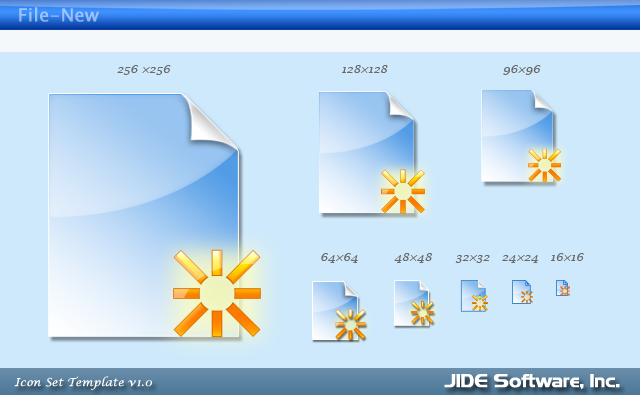
|
Java (Cross Platform) Version (JAR, PNG) |
| Java version contains a jar file with transparent PNGs of different sizes (256, 128, 96, 64, 48, 32, 24 and 16). The easiest way to use it in a Java application is to use IconSetManager and IconSet provided in open source JIDE Common Layer. Of course, you can also use them in your web applications as they are PNG files. |
| Windows Version (ICO, PNG) |
| Windows version contains a zip file for ICO files. Each icon file contains five icon images of different sizes (256, 128, 96. 64, 48, 32, 24, and 16). If you are building Window application using .NET, this is the version you should choose. |
| Mac Version (ICNS, PNG) |
| Mac version contains a zip file for ICNS file. Each icon file contains three icon images of different sizes (256, 48, 32, and 16). If you are building Mac application, this is the version you should choose. |
| Full Version (PNG, ICO, ICNS, JAR)
|
| Full version contain all the files from above three versions. It comes in a zip file. |
|
Photoshop Version (PSD, PNG, ICO, ICNS, JAR)
|
| Photoshop version contains everything full version has. It also has PSD files. PSD file is created by Adobe Photoshop. Our icon designers used those PSD files to create this icon Set. Each PSD file has named layers. If you know how to use Photoshop, you can use the resources in the exist PSD files to create all kinds of new icons. |
 
Licensing
Stock icons are pre-build icons. It includes a large number of icons at a very affordable price, in our case, at almost $1 per icon. We can do that because we sell the same stock icon set to many different customers. Stock icons are owned by JIDE. After you purchase, you gain a royalty-free, worldwide, perpetual license to use those icons in any number of products within your company. The products could be programs, applications, custom software, or websites. However, you cannot use stock icons as logos or trademarks or service marks. You are also not allowed to resell or sublicense the icons to any third-parties. If your client wants to use those icons in their own product, even they have access to those icons as they are in your product, they would still need to acquire their own license from JIDE. If you change the icons to create derivative icons, you can use them just like the original icons but the derivative icons are still owned by JIDE just like the original icons. For more information, please visit the detailed license terms. If you want to have icons that your company can own, please check out the custom design services.
|


